
1Password Review: Is It Worth It in 2026?
Passwords are part of almost everything we do online. We use them for email, shopping, banking, school accounts, work tools, streaming apps, and social media.
The problem is simple. Most people have too many passwords to remember.
Because of that, many users reuse the same password on different websites. Others save passwords in notes apps, browsers, spreadsheets, or even paper notebooks. It may feel easy, but it can create serious security risks.
That is where a password manager can help.
In this 1Password review, we will look at what 1Password does, how safe it is, how easy it feels in daily use, and whether it is worth paying for in 2026.
1Password is a popular 1Password password manager for individuals, families, and businesses. It helps you save passwords, create strong logins, fill in forms, store private notes, share items safely, and manage passkeys. 1Password also offers Watchtower, a security feature that can warn users about weak passwords, reused passwords, breaches, duplicate items, and other saved-account problems.
What Is 1Password?
1Password is a secure password manager that stores your login details in encrypted vaults.
Think of it like a digital safe. You put your passwords, credit cards, secure notes, passkeys, and other private details inside. When you need them, 1Password helps you find and use them.
Instead of remembering every password, you only need to manage your 1Password account access. From there, the app can help you sign in to websites and apps across your devices.
1Password is more advanced than simply saving passwords in your browser. It gives you better organization, secure sharing, password health alerts, and business tools. It also supports passkeys, which are a newer way to sign in without using a traditional password.
For many people, 1Password makes online security feel less confusing and more practical.
Who Should Use 1Password?
1Password is a good fit for people who want stronger online security without making their lives harder.
It works well for individuals who forget passwords often, reuse passwords, or want a safer way to store private details.
It is also useful for families. A family can use shared vaults for things like streaming accounts, Wi-Fi passwords, travel logins, home services, and shopping accounts. At the same time, each person can still keep personal items private.
For companies, 1Password works as a password manager for business. Teams can store shared logins, control access, and reduce risky habits like sending passwords in chat messages or keeping them in spreadsheets. 1Password’s secure sharing tools are designed to help teams manage credentials between admins, employees, and trusted partners.
So, 1Password is not just for tech experts. It is built for normal users, families, and teams that want better security.
Key Features of 1Password
1. Password Vaults
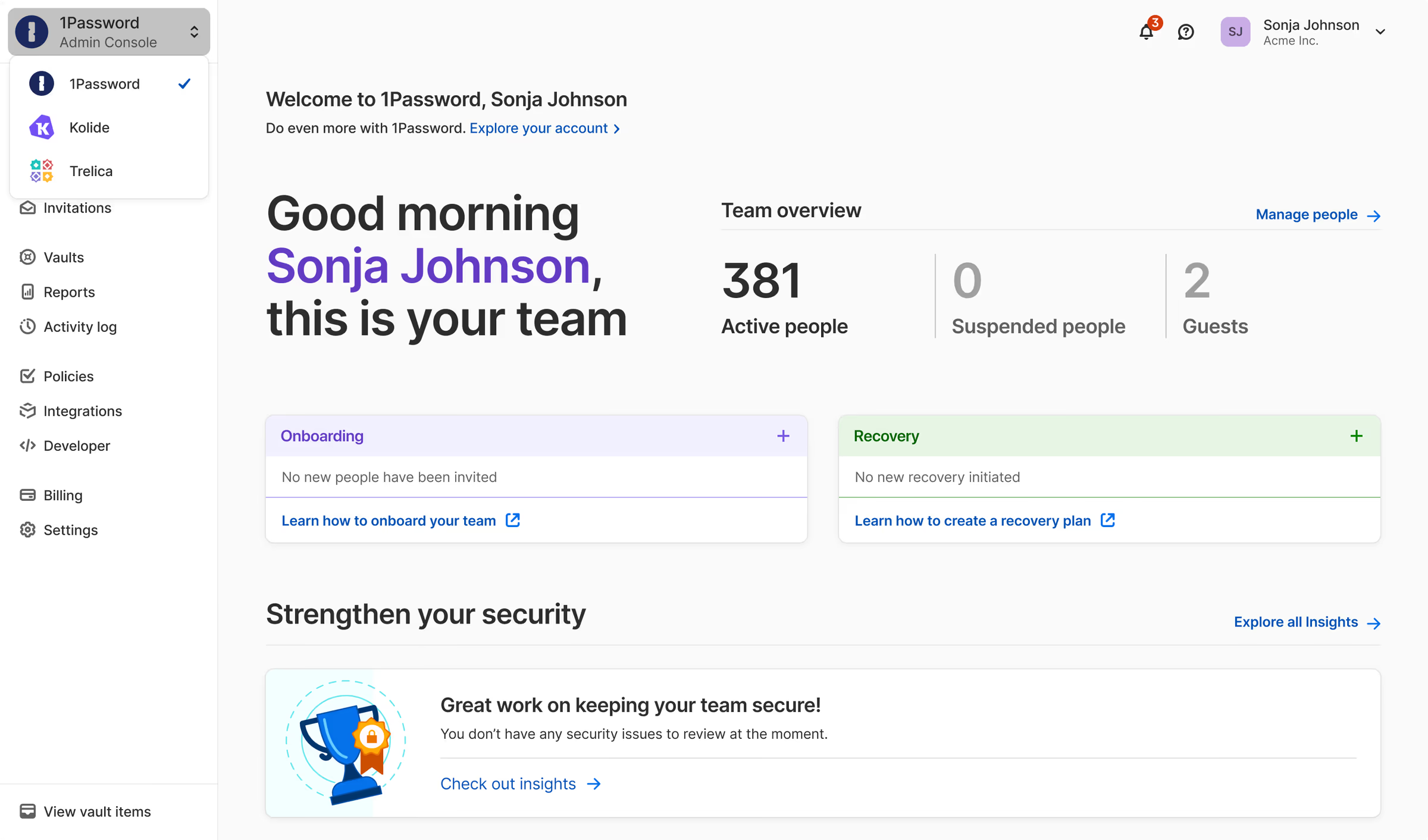
The main feature of 1Password is its password vault system.
Vaults help you organize your saved items. You can create different vaults for personal accounts, work tools, family logins, client accounts, or private documents.
This makes the app feel clean and easy to manage. You do not have to scroll through one huge list of passwords every time you need something.
Vaults are also helpful for sharing. For example, a family could have one shared vault for household accounts and separate private vaults for each person.
2. Password Generator
A strong password should be long, unique, and hard to guess.
The problem is that strong passwords are not easy to remember. That is why 1Password includes a password generator.
When you create a new account, 1Password can suggest a strong password for you. You do not have to invent one yourself or reuse an old one.
This is one of the biggest reasons to use a secure password manager. You can have different passwords for every account without needing to memorize them all.
It is really useful once you start replacing weak passwords with stronger ones.
3. Autofill
Autofill is one of the features you will use the most.
When you visit a website or app, 1Password can fill in your saved login details. This saves time and reduces typing mistakes.
Autofill also makes password security easier to follow. You do not need to copy and paste passwords from a note or browser tab.
For everyday use, this is where 1Password feels smooth. You open the website, approve the login, and move on.
4. Watchtower
Watchtower is one of the strongest features in this 1Password review.
It checks your saved items and points out possible problems. These can include weak passwords, reused passwords, duplicate items, and passwords connected to known breaches.
This is helpful because most people do not know which passwords need attention.
Watchtower gives you a clearer view of your password health. Instead of guessing, you can see which accounts should be updated first.
For business users, Watchtower can also help admins monitor password health, potential data breaches, user access, and other security issues across a team.
5. Secure Password Sharing
Sharing passwords through email, text, or chat is risky.
1Password gives users safer ways to share login details. Families can share specific vaults. Teams can give access only to the people who need it.
This is useful because not everyone needs access to everything.
For example, a marketing team may need access to social media tools, while a finance team may need access to billing accounts. With 1Password, those items can stay separate.
That makes password sharing safer and more organized.
6. Passkey Support
Passkeys are becoming more common. They let people sign in without a regular password.
1Password lets users create, use, and share passkeys. It also says passkeys stored in 1Password can be used across devices, which helps users avoid being locked into only one device or platform.
Passkeys may not replace every password right away, but they are an important part of the future of online security.
This makes 1Password feel ready for what comes next.
1Password Security: Is It Safe?
Security is the most important part of any password manager.
1Password uses a security model built around encryption and a Secret Key. According to 1Password, your account data is protected by a 128-bit Secret Key, which works with your account password to encrypt your data.
In simple words, 1Password is designed so that your saved data is locked before it is stored.
This is important because a password manager holds sensitive information. If you use one, you need to trust that it is built carefully.
1Password’s design focuses on keeping your private information protected. Your passwords are not meant to be readable by 1Password employees or anyone else who should not have access.
Of course, no tool can make you 100% safe online. You still need to use good habits. That means protecting your main account, using two-factor authentication when possible, and keeping your recovery information safe.
But overall, 1Password security is one of the biggest reasons people choose this tool over basic browser password saving.
1Password Pricing
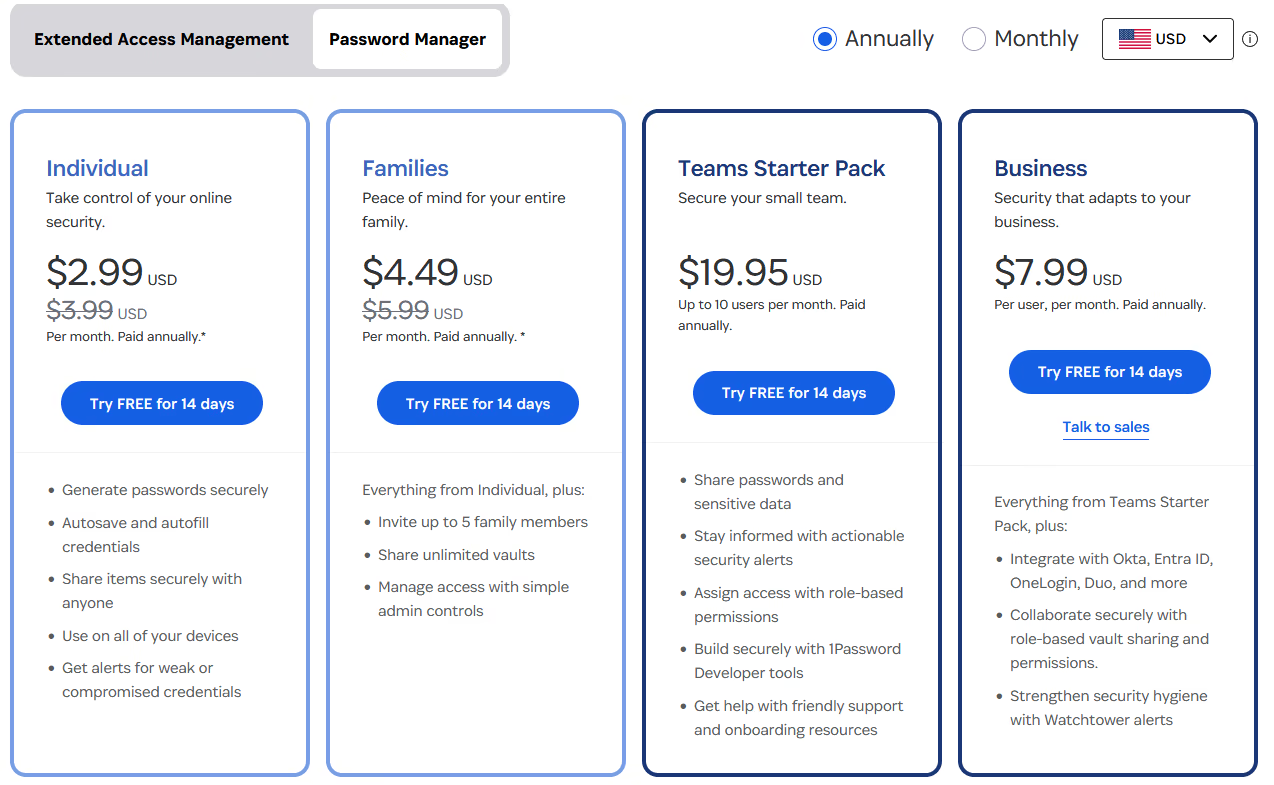
1Password is a paid password manager. It does not offer a full free plan, but it does offer a free trial. 1Password says users can try any plan for free for 14 days.
At the time of writing, the official 1Password pricing page lists plans for individuals, families, teams, and businesses. The page says pricing can be as little as $48 per year for an individual or $72 per year for a family of five, depending on the plan. Business pricing changes based on team size and plan type.
This makes 1Password more of a premium tool than a basic free option.
Is it cheap? Not exactly.
Is it worth the cost? For many users, yes.
If you only need simple password saving, you may find cheaper options. But if you want strong security, sharing tools, Watchtower alerts, vaults, and business controls, 1Password gives you a lot for the price.
Check 1Password pricingPricing note: 1Password prices and plan details can change. Always check the final pricing page before subscribing.
What We Like About 1Password
The best thing about 1Password is that it makes security feel simple.
Some cybersecurity tools feel too technical. 1Password does not. The app is clean, the vaults make sense, and the browser extension helps with daily logins.
We also like that Watchtower gives users clear action steps. Instead of saying “be more secure,” it shows which passwords may need to be changed.
The sharing tools are another strong point. Families and teams can share only what they need, instead of passing passwords around in unsafe ways.
1Password also feels polished across different use cases. It can work for one person, a household, a small business, or a larger company.
That flexibility makes it a strong choice for a review website’s security category.
What Could Be Better?
1Password is not perfect.
The biggest downside is that it costs money. Some people may not want another subscription, especially when browsers already save passwords for free.
There is also a small learning curve. New users need to understand vaults, the Secret Key, recovery options, and how autofill works.
This is not too difficult, but it may take a little time at first.
Another thing to remember is account recovery. Because 1Password is built for strong privacy, losing access to your account details can become a real problem. Users should save their emergency information in a safe place during setup.
1Password for Families
1Password is a strong choice for families because it makes shared accounts easier to manage.
Many households share passwords for streaming services, shopping accounts, travel sites, Wi-Fi, school tools, and home services.
Without a password manager, those details often end up in text messages or random notes.
With 1Password, families can create shared vaults and keep private vaults separate. This makes sharing safer without removing privacy.
It is especially useful for parents who want to help family members use stronger passwords without needing to know every personal login.
1Password for Business
For businesses, 1Password is more than a password vault.
It helps teams protect company logins, share access safely, and remove access when someone changes roles or leaves the company.
This matters because companies often use many tools. Marketing, sales, support, finance, and development teams may all need access to different accounts.
A password manager for business can reduce messy and risky habits. Instead of saving passwords in spreadsheets or sending them in chat, teams can store them in controlled vaults.
1Password also offers business-focused features like admin tools, password health monitoring, and secure sharing. For teams that care about security, these features can make a big difference.
Pros and Cons
Pros | Cons |
|---|---|
|
|
Final Verdict
To wrap up this 1Password review, 1Password is one of the best password manager options for users who want security without too much complexity.
It is not the cheapest tool, and it may take a little time to learn. But once it is set up, it can make your online life much easier.
For individuals, it helps replace weak and reused passwords.
For families, it makes shared accounts safer and easier to manage.
For businesses, it gives teams better control over private logins and sensitive access.
Overall, 1Password is a polished, reliable, and secure password manager. If you want better password habits in 2026, it is absolutely worth considering.