
Namecheap Hosting Review: Is This Deal Worth It?
Disclosure: Some links in this article may be affiliate links. If you purchase through them, we may earn a commission at no extra cost to you. Our reviews remain independent and are based on research, product information, pricing, features, and practical value for users.
Choosing a web hosting service is one of the first important decisions you make when starting a website. A good hosting provider can help your site load faster, stay online, and feel easier to manage. A poor hosting choice can lead to slow pages, technical problems, and extra stress.
In this Namecheap hosting review, we look at Namecheap Shared Hosting as both a hosting service and a current Bi yearly deal. We cover the pricing, main features, plan differences, pros, cons, and who should consider each plan.
Namecheap is well known for domain names, but it also offers web hosting services for beginners, bloggers, small businesses, and WordPress users. Its shared hosting plans are usually promoted as affordable options for people who want to launch a website without spending too much money upfront.
The current Bi yearly offer is especially interesting because it includes a 30 day free trial. This means users can start for $0.00 for the first 30 days, then continue with the discounted price after the trial period.
But is this Namecheap hosting deal actually worth it?
For many beginners and small website owners, the answer is yes. Namecheap Shared Hosting can be a practical choice if you want affordable hosting, free website migration, free SSL installation, LiteSpeed webserver, unmetered bandwidth, and beginner friendly website tools.
However, the best plan depends on your needs. Stellar is enough for simple websites. Stellar Plus looks like the best value for most users. Stellar Business is better for users who need stronger resources, cloud storage, and more advanced security.
Quick Verdict
Namecheap Shared Hosting is a strong option for users who want affordable web hosting with useful features included. It is especially suitable for beginners, small business owners, bloggers, portfolio websites, and people launching their first WordPress site.
The current Bi yearly deal gives users a 30 day free trial, then discounted monthly pricing after the trial. This makes it easier to test the hosting service before paying.
The Stellar plan is the cheapest option and works well for small websites. The Stellar Plus plan offers the best balance for most users because it supports unlimited websites, unmetered SSD storage, unlimited mailboxes, and AutoBackup. The Stellar Business plan is better for users who need more storage quality, stronger security, and a higher file limit.
The main thing to remember is that shared hosting is not designed for every type of website. It is a good starting point, but larger websites with heavy traffic may eventually need VPS hosting, cloud hosting, or dedicated hosting.
What Is Namecheap Shared Hosting?
Namecheap Shared Hosting is a hosting service where multiple websites share server resources. This is one of the most common and affordable types of hosting.
For beginners, shared hosting is often the easiest way to start. You do not need to manage a server by yourself. You get a hosting account, a control panel, website tools, email features, SSL installation, and support for popular platforms like WordPress.
Namecheap Shared Hosting is designed for people who want to launch and manage websites without needing advanced technical knowledge.
Website type | Is Namecheap Shared Hosting suitable? |
|---|---|
Personal blogs | Yes |
Portfolio websites | Yes |
Small business websites | Yes |
WordPress websites | Yes |
Landing pages | Yes |
Small online projects | Yes |
High traffic enterprise sites | Not the best fit |
Large online stores | May need stronger hosting later |
The biggest advantage of shared hosting is the price. It allows users to start a website at a lower cost. The tradeoff is that resources are shared, so performance may depend on your plan, website size, optimization, and traffic level.
Who Should Use Namecheap Shared Hosting?
Namecheap Shared Hosting may be a good choice for people who want a simple and affordable way to get online.
It is especially useful for beginners who are launching their first website. If you are starting a blog, portfolio, personal brand website, or small business page, Namecheap gives you enough tools to begin without a large budget.
It can also work well for freelancers and creators. For example, a graphic designer, writer, photographer, or consultant can use Namecheap hosting to build a professional portfolio and connect it with a custom domain.
Small businesses may also find it useful. A restaurant, local service, small agency, or startup can use shared hosting to create a basic website with contact information, service pages, blog content, and landing pages.
Namecheap Shared Hosting is also a good fit for WordPress users. The plans include tools like AI for WordPress, website builders, Softaculous Script Installer, free automatic SSL installation, and LiteSpeed webserver.
It is also helpful for users who want email accounts connected to their domain. Depending on the plan, you can get 30 mailboxes or unlimited mailboxes.
Who Should Avoid Namecheap Shared Hosting?
Namecheap Shared Hosting is not the best choice for every website.
You may want to avoid shared hosting if you expect very high traffic from the beginning. Large websites, busy ecommerce stores, membership platforms, and resource heavy web apps usually need stronger hosting.
It may also not be ideal if you need full server control. Shared hosting is easier to use, but it gives you less control than VPS or dedicated hosting.
If your website needs advanced server configurations, custom software, or very high performance resources, shared hosting may feel limited.
It may also not be the best fit if you want premium managed WordPress hosting. Namecheap Shared Hosting can run WordPress, but it is not the same as a high end managed WordPress platform built only for WordPress performance and expert support.
In simple words, Namecheap Shared Hosting is best for starting and growing smaller websites. It may not be enough forever if your project becomes large.
Namecheap Shared Hosting Pricing and Current Bi yearly Deal
Pricing is one of the most important parts of this Namecheap hosting review. The current Bi yearly offer includes a 30 day free trial, which means users can start for $0.00 for the first 30 days.
After the trial, the discounted Bi yearly pricing applies.
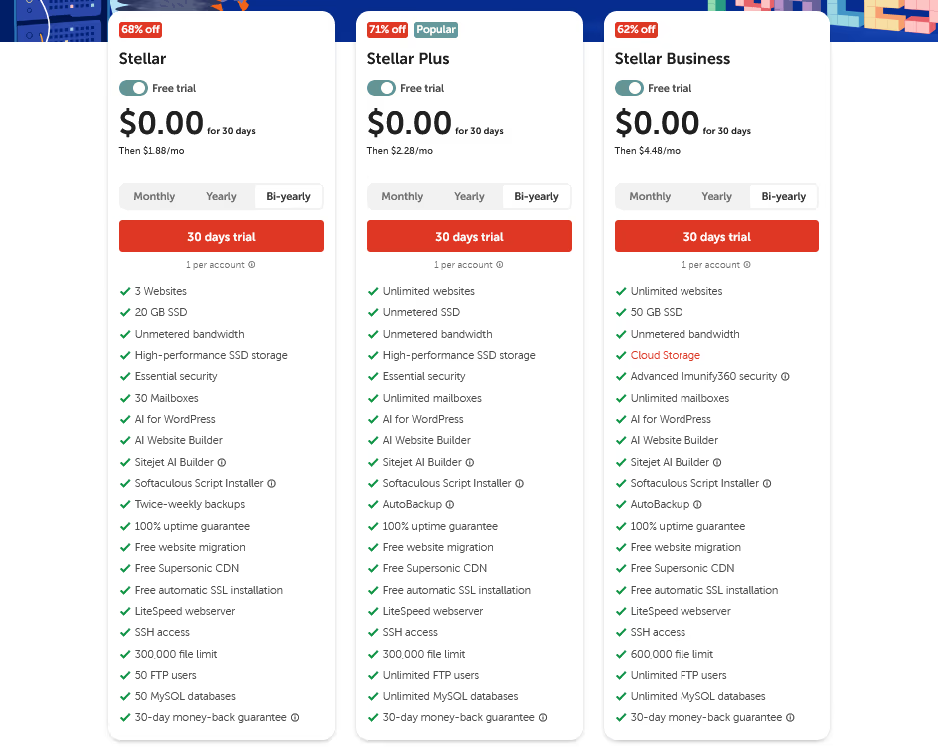
Based on the current offer shown in the screenshot, Namecheap Shared Hosting includes three main plans: Stellar, Stellar Plus, and Stellar Business.
Plan | Discount | Free trial | Price after trial | Best for |
|---|---|---|---|---|
Stellar | 68% off | $0.00 for 30 days | Then $1.88 per month | Beginners and small websites |
Stellar Plus | 71% off | $0.00 for 30 days | Then $2.28 per month | Growing websites and multiple sites |
Stellar Business | 62% off | $0.00 for 30 days | Then $4.48 per month | Business websites and stronger resources |
The Stellar plan is the most affordable option. It is best for users who want to host a simple website, personal blog, portfolio, or small business page.
The Stellar Plus plan is marked as the popular option. It costs only a little more than Stellar, but it adds unlimited websites, unmetered SSD storage, unlimited mailboxes, and AutoBackup. For many users, this plan offers the best value.
The Stellar Business plan is the most advanced shared hosting option in this offer. It includes 50 GB SSD cloud storage, Advanced Imunify360 security, unlimited mailboxes, and a higher file limit. This plan is better for users who need a more business focused hosting package.
Check Current Namecheap Hosting DealPricing note: Prices and discounts are based on the current Bi yearly offer. Hosting prices, discounts, and plan details may change at any time. Always check the final checkout page before subscribing.
Namecheap Shared Hosting Plan Comparison
The three plans may look similar at first, but the differences matter. The right plan depends on how many websites you want to host, how much storage you need, and whether you want extra backup and security features.
Feature | Stellar | Stellar Plus | Stellar Business |
|---|---|---|---|
Websites | 3 websites | Unlimited websites | Unlimited websites |
Storage | 20 GB SSD | Unmetered SSD | 50 GB SSD cloud storage |
Bandwidth | Unmetered | Unmetered | Unmetered |
Mailboxes | 30 mailboxes | Unlimited mailboxes | Unlimited mailboxes |
AutoBackup | Twice weekly backups | AutoBackup | AutoBackup |
File limit | 300,000 files | 300,000 files | 600,000 files |
FTP users | 50 FTP users | Unlimited FTP users | Unlimited FTP users |
MySQL databases | 50 databases | Unlimited databases | Unlimited databases |
Advanced Imunify360 security | Not listed | Not listed | Included |
Money back guarantee | 30 days | 30 days | 30 days |
For most users, Stellar Plus is the most attractive plan. The price difference between Stellar and Stellar Plus is small, but the upgrade gives you much more flexibility.
If you only need one simple website, Stellar can be enough. If you plan to create more than one website, use several email accounts, or grow your project, Stellar Plus is easier to recommend.
Stellar Business is better for users who want stronger hosting features inside the shared hosting category. It is useful if you care about cloud storage, a higher file limit, and stronger security.
Which Namecheap Plan Offers the Best Value?
For most users, Stellar Plus offers the best value.
The reason is simple. It gives you more freedom for a small price difference. You get unlimited websites, unmetered SSD storage, unlimited mailboxes, and AutoBackup. These features are useful if you plan to grow your website or manage multiple projects.
The Stellar plan is still a good choice if your needs are simple. If you only want to host one small website, start a blog, or create a portfolio, Stellar gives you the basics at the lowest price.
The Stellar Business plan is best for users who want a stronger shared hosting setup. It is not necessary for every beginner, but it can be worth considering for business websites that need better storage, more file capacity, and advanced security.
Our simple recommendation is this:
Choose this plan | If you need |
|---|---|
Stellar | The cheapest plan for a simple website |
Stellar Plus | The best balance between price and features |
Stellar Business | More business focused features, cloud storage, and stronger security |
Main Namecheap Shared Hosting Features
30 Day Free Trial
One of the most attractive parts of the current Bi yearly deal is the 30 day free trial. Users can start for $0.00 for the first 30 days.
This is helpful because hosting is something you should test before committing. During the trial, you can explore the dashboard, install WordPress, test the website builder, check email tools, and see if the service feels comfortable.
For beginners, this lowers the pressure. Instead of paying immediately, you get time to understand how the hosting works.
Free Website Migration
Namecheap Shared Hosting includes free website migration. This is useful if you already have a website hosted somewhere else and want to move it to Namecheap.
Website migration can feel stressful for beginners because it involves files, databases, domains, and email settings. A free migration service can make the move easier.
This feature is especially helpful for users who are unhappy with their current hosting provider and want to switch without handling every technical detail alone.
Free Automatic SSL Installation
SSL is important for every modern website. It helps secure the connection between your website and visitors. It also allows your site to use HTTPS.
Namecheap includes free automatic SSL installation, which is helpful for beginners. You do not need to manually search for SSL certificates or install them in a complicated way.
For business websites, SSL is essential. Visitors are more likely to trust a site that shows a secure connection.
LiteSpeed Webserver
Namecheap Shared Hosting includes LiteSpeed webserver. LiteSpeed is known for speed and performance, especially when used with optimized websites.
This can be useful for WordPress sites because loading speed affects user experience. A faster website feels more professional and can reduce the chance that visitors leave quickly.
Of course, hosting is only one part of speed. Your website theme, images, plugins, caching, and content structure also matter.
Free Supersonic CDN
A CDN helps deliver website content from servers closer to the visitor. This can improve loading times, especially when your audience comes from different locations.
Namecheap includes Free Supersonic CDN, which can be useful for small websites that want better performance without paying for a separate CDN service.
For beginners, having CDN access included is a nice advantage.
Unmetered Bandwidth
All three plans include unmetered bandwidth. This means Namecheap does not place a strict fixed bandwidth limit in the same way some hosts do.
This is useful for small websites that may grow over time. However, unmetered does not mean unlimited in every possible situation. Hosting providers usually still have fair usage rules and resource limits.
For normal blogs, portfolios, and small business websites, this should be more than enough.
Email Accounts
Namecheap Shared Hosting includes email features. The Stellar plan includes 30 mailboxes, while Stellar Plus and Stellar Business include unlimited mailboxes.
This can be valuable for business owners who want professional email addresses using their own domain.
For example, instead of using a free email address, a business can create addresses like contact, support, sales, or team members under its own domain.
This makes the brand look more professional.
AI Website Builder and AI for WordPress
The plans include AI Website Builder and AI for WordPress. These tools may help beginners create websites faster, especially if they do not know how to design from scratch.
AI tools can help with layout ideas, page structure, and content creation. They are not a full replacement for good design or strategy, but they can make the starting process easier.
For users who want to launch quickly, these tools can be useful.
Softaculous Script Installer
Softaculous Script Installer helps users install popular applications such as WordPress and other website tools with fewer steps.
This is useful because beginners often struggle with manual installation. A script installer can make the setup process faster and less stressful.
If your goal is to launch a WordPress website, this feature is practical.
SSH Access
All plans include SSH access. This is more useful for advanced users who want command line access to their hosting environment.
Beginners may not need it, but it is good to have as your skills improve.
This makes Namecheap Shared Hosting more flexible than a very basic beginner only hosting service.
100 Percent Uptime Guarantee
The plans list a 100 percent uptime guarantee. Uptime is important because it relates to how often your website is available online.
For any website owner, downtime can be frustrating. If your site is unavailable, visitors cannot read your content, contact your business, or buy from you.
A guarantee is a positive sign, but real world uptime can still depend on different factors. It is always smart to monitor your website after launch.
Is Namecheap Shared Hosting Easy to Use?
Namecheap Shared Hosting is beginner friendly. The service is designed for users who want to create and manage websites without handling complex server work.
For a new website owner, the most important things are simple setup, clear hosting tools, SSL, WordPress installation, email management, and support when something goes wrong.
Namecheap provides many of these features in one place.
The 30 day free trial also makes the service easier to test. You can explore the dashboard and see whether the hosting environment feels comfortable before paying.
That said, web hosting always has a learning curve. Even with beginner friendly hosting, users may still need to learn how to connect a domain, install WordPress, set up email, choose a theme, optimize images, and manage backups.
Namecheap makes these tasks easier, but it does not remove the need to learn basic website management.
Is Namecheap Shared Hosting Good for WordPress?
Yes, Namecheap Shared Hosting can be a good option for WordPress beginners.
The plans include AI for WordPress, Softaculous Script Installer, LiteSpeed webserver, free SSL installation, and website builder tools. These features make it easier to install and run a WordPress website.
For a small blog, portfolio, affiliate website, review site, or local business website, Namecheap Shared Hosting can be enough to start.
However, if your WordPress website becomes large, receives heavy traffic, or uses many resource heavy plugins, you may eventually need a stronger hosting plan.
For most beginners, starting with shared hosting is reasonable. You can upgrade later when your website grows.
Is Namecheap Shared Hosting Good for Small Businesses?
Namecheap Shared Hosting can be a good choice for small businesses that need a simple website at a low cost.
A small business usually needs a few important things: a professional website, secure connection, business email, fast loading pages, and reliable access for visitors.
Namecheap offers many of these basics. The free automatic SSL installation helps protect the site. The email features help create professional mailboxes. The website builder and WordPress tools help with setup.
For small service businesses, restaurants, agencies, freelancers, local shops, and personal brands, Namecheap can be a practical starting point.
The Stellar Plus plan may be the best option for many small businesses because it gives more flexibility than Stellar while staying affordable.
Namecheap Pros and Cons
Pros | Why it matters |
|---|---|
Affordable pricing | Good for beginners and small website owners |
30 day free trial | Lets users test the service before paying |
Free website migration | Helpful for users moving from another host |
Free automatic SSL installation | Makes websites more secure and professional |
LiteSpeed webserver | Can help improve website performance |
Free Supersonic CDN | Useful for faster content delivery |
WordPress friendly tools | Good for bloggers and WordPress beginners |
Professional email features | Useful for businesses and brands |
Stellar Plus offers strong value | Good balance between price and features |
30 day money back guarantee | Adds extra confidence after purchase |
Cons | Why it matters |
|---|---|
Shared resources | Not ideal for very large or high traffic websites |
Best value requires Bi yearly commitment | Not ideal for users who want only monthly flexibility |
Stellar plan has limits | Only 3 websites, 20 GB SSD, and 30 mailboxes |
Advanced features are plan dependent | Some users may need to choose a higher plan |
Beginners still need to learn hosting basics | Hosting is easier, but not completely automatic |
Not a premium managed WordPress host | Advanced WordPress users may want stronger specialized hosting |
Namecheap Deal Review
As a deal, the current Namecheap Shared Hosting Bi yearly offer is strong for beginners and small website owners.
The biggest advantage is the 30 day free trial. Many hosting providers require payment immediately, so the ability to start for $0.00 gives users more room to test the service.
The discounted prices are also attractive. Stellar starts at $1.88 per month after the trial, Stellar Plus starts at $2.28 per month, and Stellar Business starts at $4.48 per month.
The Stellar Plus plan stands out the most. It is only slightly more expensive than Stellar, but it includes unlimited websites, unmetered SSD storage, unlimited mailboxes, and AutoBackup. For users who want room to grow, this is the most balanced plan.
The Stellar Business plan is also interesting for business users. It offers cloud storage, Advanced Imunify360 security, and a higher 600,000 file limit. These features may matter more if your website is connected to a serious business project.
The deal is less ideal for users who only need hosting for one month or do not want a longer commitment. It is also not the best choice for websites that already need advanced performance resources.
Overall, this deal is worth considering if you want affordable hosting, a free trial, and useful features for launching or growing a website.
Namecheap Compared With Alternatives
Namecheap is not the only hosting provider available. It is useful to compare it with other popular options before choosing.
Namecheap vs Bluehost
Bluehost is popular among WordPress beginners and is often recommended for users who want a familiar WordPress hosting experience.
Namecheap may be better for users who want lower pricing, a 30 day free trial, and affordable shared hosting with practical features.
Bluehost may be better for users who want a more WordPress focused brand and do not mind paying more depending on the plan.
Namecheap vs Hostinger
Hostinger is known for affordable hosting and beginner friendly tools. It is a strong competitor in the budget hosting space.
Namecheap is also affordable and may be attractive for users who already use Namecheap for domains. Keeping your domain and hosting under one account can make management simpler.
Hostinger may be better for users who want a very polished website building experience. Namecheap may be better for users who want budget hosting with domain services and simple shared hosting plans.
Namecheap vs SiteGround
SiteGround is often seen as a more premium shared hosting provider, especially for users who care about support and performance.
Namecheap is usually more budget friendly. It is better for users who want to start at a lower cost.
SiteGround may be better for users who have a larger budget and want stronger support or a more premium hosting experience.
Real Use Cases
Starting a Blog
Namecheap Shared Hosting can be a good choice for a beginner blog. You can install WordPress, use SSL, create email accounts, and start publishing content without spending too much money.
The Stellar plan may be enough for one small blog, but Stellar Plus gives more room to grow.
Building a Portfolio Website
A designer, writer, photographer, or freelancer can use Namecheap to build a portfolio website with a custom domain and professional email address.
This is a simple use case, and the Stellar plan can work well.
Creating a Small Business Website
A small business website usually needs service pages, contact forms, business email, SSL, and reliable hosting.
Stellar Plus may be the better choice here because it gives more flexibility and unlimited mailboxes.
Managing Multiple Small Websites
If you plan to build several websites, Stellar Plus is much better than Stellar because it supports unlimited websites.
This can be useful for freelancers, affiliate marketers, creators, and small agencies.
Hosting a Business Project
For a more serious business website, Stellar Business may be worth considering. It adds 50 GB SSD cloud storage, Advanced Imunify360 security, and a higher file limit.

What We Like About Namecheap Shared Hosting
We like that Namecheap makes shared hosting affordable and accessible. The pricing is friendly for beginners, and the 30 day free trial makes the offer feel less risky.
We also like that important features are included across the plans. Free website migration, free SSL installation, LiteSpeed webserver, Free Supersonic CDN, SSH access, and a 30 day money back guarantee are useful features.
The Stellar Plus plan is the highlight of the offer. It gives users more space to grow without a big increase in price.
We also like that Namecheap is useful for both domains and hosting. Many users already know Namecheap as a domain registrar, so adding hosting under the same account can be convenient.
What Could Be Better
Namecheap could make the pricing and plan differences easier to understand for beginners. Some users may not know what terms like unmetered SSD, file limit, CDN, or SSH access mean.
The Stellar plan is affordable, but it has clear limits. It supports only 3 websites, 20 GB SSD, 30 mailboxes, 50 FTP users, and 50 MySQL databases. That is enough for many beginners, but users who plan to grow may quickly prefer Stellar Plus.
Shared hosting also has natural limits. It is good for small and growing websites, but not ideal for projects that need dedicated resources from the beginning.
We would also like to see clearer examples on the pricing page showing which plan is best for different types of users.
Final Verdict
Namecheap Shared Hosting is a strong choice for beginners, bloggers, freelancers, and small businesses that want affordable web hosting with useful features included.
The current Bi yearly deal is attractive because it includes a 30 day free trial, then discounted monthly prices after the trial. Stellar starts at $1.88 per month, Stellar Plus starts at $2.28 per month, and Stellar Business starts at $4.48 per month.
The Stellar plan is best for simple websites and beginners who want the lowest price. The Stellar Plus plan is the best value for most users because it includes unlimited websites, unmetered SSD storage, unlimited mailboxes, and AutoBackup. The Stellar Business plan is better for business users who want cloud storage, advanced security, and a higher file limit.
Namecheap is not the best choice for every website. If you need premium managed hosting, advanced server control, or high performance resources for a large website, you may need a stronger hosting option.
But for most small websites, WordPress projects, portfolios, blogs, and small business sites, Namecheap Shared Hosting is worth considering.
Overall, this deal is a good option if you want affordable hosting, a beginner friendly setup, and enough features to launch or grow a website without paying too much at the start.
Check Current Namecheap Hosting Deal