
Benchmark Email Review: Simple Email Marketing Tested

Disclosure: Some links in this article may be affiliate links. If you purchase through them, we may earn a commission at no extra cost to you. Our reviews remain independent and are based on research, product information, pricing, features, and practical value for users.
Choosing email marketing software can feel simple at first, until you compare plans, send limits, automation tools, contact rules, and upgrade costs.
That is where this Benchmark Email review can help.
Benchmark Email is built for people who want to create, send, and track email campaigns without needing a complicated marketing system. It focuses on the core jobs most small businesses need: building emails, managing contacts, creating signup forms, sending newsletters, checking reports, and setting up basic automation.
After reviewing its current official product and pricing information, our view is that Benchmark Email is best for users who value simplicity, clean campaign building, and predictable email marketing basics. It is not the most advanced automation or ecommerce platform on the market, but it can be a practical choice for small businesses, nonprofits, creators, agencies, and local service providers that want email marketing without a steep learning curve.
What Is Benchmark Email?

Benchmark Email is an email marketing software platform used to design emails, manage subscribers, send campaigns, build signup forms, create landing pages, and track campaign performance.
The product is aimed at users who want email marketing to feel approachable. Instead of focusing only on complex marketing funnels, Benchmark Email puts a lot of attention on usability. You can build campaigns with a drag and drop editor, organize contacts with lists and tags, personalize messages with contact fields, and review reports after each send.
The platform also includes AI assisted content tools, stock images, AI generated images, mobile previews, test emails, and an email audit checklist. These features are useful for teams that do not have a designer, developer, or dedicated email specialist.
In simple terms, Benchmark Email helps you answer four practical questions:
What should we send?
Who should receive it?
Did people engage with it?
What should we send next?
That makes it a good fit for businesses that want a clear email workflow rather than a heavy enterprise marketing suite.
Explore Benchmark EmailWho Is Benchmark Email Best For?
Benchmark Email is best for small and growing teams that need dependable email marketing without too much complexity.
Best fit users
Benchmark Email is especially useful for:
User type | Why Benchmark Email can fit |
|---|---|
Small businesses | It offers a simple email builder, contact tools, reports, and forms without requiring a large marketing team. |
Nonprofits | The free plan and nonprofit discount options can make it easier to start email outreach on a limited budget. |
Creators and bloggers | It works well for newsletters, audience updates, content promotion, and simple subscriber segmentation. |
Local service businesses | It can support appointment reminders, announcements, seasonal offers, and customer education emails. |
Ecommerce beginners | It can help send product updates, welcome emails, promotions, and follow up campaigns, although advanced ecommerce teams may want deeper tools. |
Agencies managing basic campaigns | The editor and reporting tools are easy enough for routine client newsletters and simple campaigns. |
Who may not need it
Benchmark Email may not be the best fit if you need very advanced customer journeys, complex sales CRM features, predictive ecommerce segmentation, deep revenue attribution, or advanced multichannel automation.
For example, a large online store that wants highly detailed product recommendations, abandoned cart logic, SMS flows, customer lifetime value segmentation, and advanced purchase based triggers may find a more specialized platform better.
Key Features
Drag and drop email builder
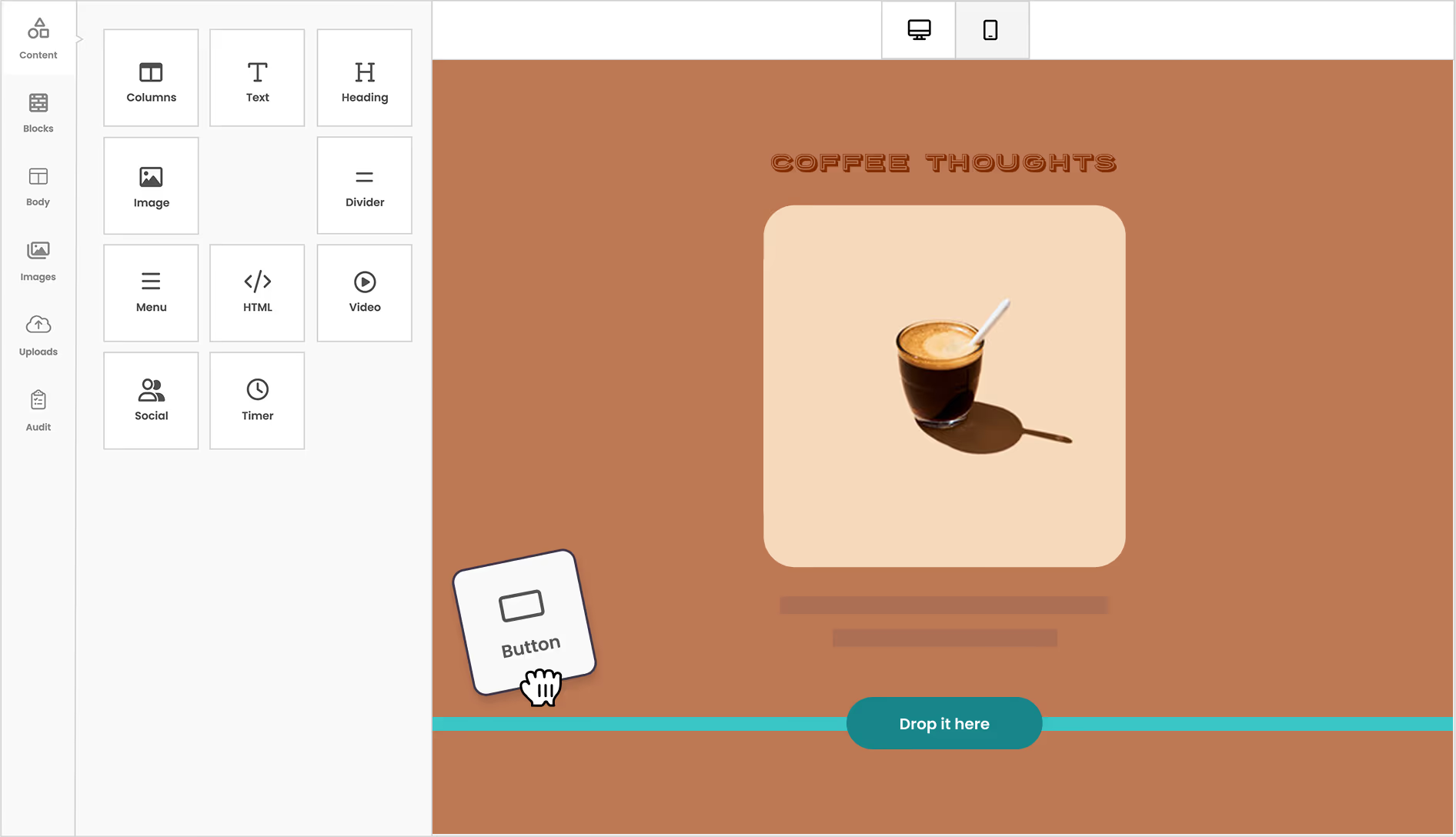
The email editor is one of Benchmark Email’s strongest areas. It is designed for users who want to build emails visually, without coding.
You can add text, images, buttons, columns, dividers, menus, social icons, videos, and other content blocks. This makes it easy to build newsletters, product announcements, event reminders, and promotional emails.
A practical example would be a local fitness studio creating a monthly newsletter. The team could use a ready made template, add class updates, insert images, include a button for bookings, preview the email on mobile, and send a test before publishing.
Templates and blank layouts
Benchmark Email includes ready made templates for users who want a faster start. It also offers blank layouts for teams that prefer more control.
This is useful because not every campaign needs the same design approach. A restaurant may want a polished seasonal promotion template, while a consultant may prefer a simple text based newsletter that feels more personal.
Contact management
Benchmark Email lets users store contacts, create custom fields, import and export contacts, search records, filter subscribers, and organize audiences using lists and tags.
This matters because email marketing only works well when your audience is organized.
For example, a nonprofit could tag contacts as donors, volunteers, event attendees, and board members. Then it could send a fundraising appeal to donors, a shift reminder to volunteers, and an event recap to attendees.
Segmentation and personalization
Benchmark Email supports targeted lists, personalized subject lines, merge fields, and custom reply to settings.
These tools make campaigns feel less generic.
A small store could send a first name personalized subject line to recent buyers. A travel advisor could segment contacts by destination interest. A B2B consultant could send different content to leads, current clients, and past clients.
Personalization is not just about adding a name. It is about making the message feel relevant to the person receiving it.
Signup forms
Benchmark Email includes a drag and drop signup form builder. You can collect subscriber details, add custom fields, set custom thank you messages, sync subscribers to lists or tags, and use built in Google reCAPTCHA protection.
This is important for list growth.
A blogger could add a simple newsletter form to a website. A gym could collect names, emails, and fitness goals. A shop could collect email addresses for sale alerts and automatically tag new subscribers based on the form they used.
Landing pages
Benchmark Email offers a landing page builder with drag and drop editing, templates, form integration, branded links, and goal tracking.
Landing pages are useful when you want one focused page for one focused action.
For example, you might create a page for:
A free guide download
A webinar registration
A seasonal sale
A new product launch
A nonprofit donation campaign
One note is important. Some official help content for the Classic platform says free users can create and test landing pages but cannot publish them. The current main pricing page presents a simplified feature structure, so we recommend checking landing page publishing access inside the account before relying on the free plan for live landing page campaigns.
Email automation
Benchmark Email supports automated email series triggered by website and email engagement. Its automation examples include welcome series, abandoned cart follow ups, lead conversion sequences, and purchase confirmation workflows.
This can save time for small teams.
For example, instead of manually emailing every new subscriber, you can create a welcome sequence:
Email one welcomes the subscriber.
Email two shares your best content or top products.
Email three offers a next step, such as booking a call or using a discount.
For many small businesses, this level of automation is enough. However, teams that need very advanced branching, complex CRM scoring, and detailed ecommerce journeys may want to compare Benchmark Email with more automation focused tools.
Reporting and activity tracking
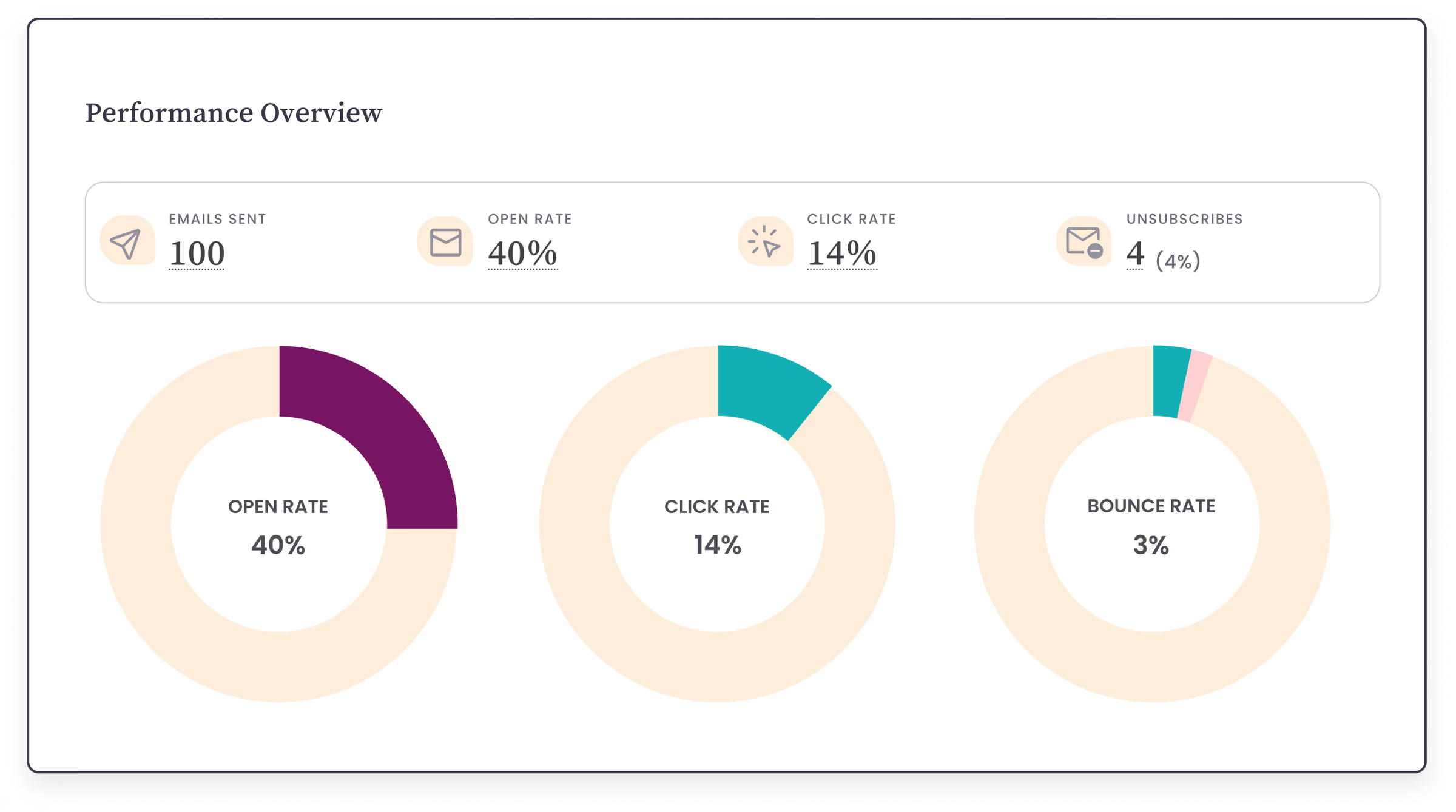
Benchmark Email includes reporting tools such as campaign performance overview, email reports, link activity, engagement timelines, and contact activity feeds.
These reports help you understand what happened after you sent a campaign.
You can look at which links were clicked, how contacts engaged, and which campaigns performed better over time. This helps users improve subject lines, content, offers, send times, and audience targeting.
AI tools
Benchmark Email includes Smart Text features that can help refine tone, summarize text, fix spelling and grammar, expand content, and rephrase writing. It also offers AI generated images and stock image access.
These tools are useful for teams that need campaign help but do not have copywriters or designers available every day.
For example, if your email intro sounds too formal, Smart Text can help make it warmer. If you need a quick campaign image, the AI image tool can help create a visual based on a prompt.
We would still review AI generated content carefully before sending. AI can speed up production, but your brand voice, accuracy, and offer details still need a human check.
Integrations and API options
Benchmark Email supports integrations, including workflow connections through Zapier. It also has API options for teams that want custom integrations.
This is useful when you want to connect forms, spreadsheets, ecommerce tools, CRM systems, or other apps to your email list.
For many non technical users, Zapier is the easiest route. For developers, API access gives more flexibility.
Benchmark Email Pricing and Plans
Benchmark Email uses contact based pricing with send limits tied to your plan.
The current public Benchmark website lists a Free plan, a Pro plan, and an Enterprise plan. During our review, we noticed one inconsistency across official Benchmark pages. The main website and pricing page list the free plan as 500 contacts and 2,500 monthly email sends. A Classic help center article lists 3,500 monthly sends. Because the public pricing page and homepage are the main buying pages, we treat 2,500 monthly sends as the safer current figure.
Always confirm the final price and limits inside the checkout page before upgrading.
Pricing overview
Plan | Price | Main limits | Best for |
|---|---|---|---|
Free | $0 per month | 500 contacts, up to 2,500 email sends per month, 1 user, 1 verified domain | Testing the platform, small newsletters, early list building |
Pro | Starts at $19 per month on the homepage, with pricing changing by contact level | 1,000 plus contacts, up to 10 times your contact limit in monthly sends, 1 user included, extra users cost more | Growing businesses that send regular campaigns |
Enterprise | Custom quote | Designed for 100,000 plus contacts with customized sends, users, domains, and support | Larger senders and teams that need custom support |
Free plan
The free plan is useful for testing Benchmark Email with a real list before paying.
It includes the core email marketing experience, such as the email builder, contact management, signup forms, reports, and support. The main limit is scale. You get up to 500 contacts and up to 2,500 sends per month according to the main pricing page.
This is enough for a small newsletter, a startup list, a community group, or a creator testing email marketing for the first time.
The free plan is not ideal if you already have a larger list, need multiple team members, or want to send frequent campaigns to all contacts.
Pro plan
The Pro plan is for users who need more contacts and more monthly sending capacity.
Benchmark states that paid plans can send up to 10 times the contact limit each month. That means if your plan is based on 2,500 contacts, your monthly send limit would be higher than the free plan and better suited for regular campaigns.
The Pro plan includes 1 user. Additional users are billed separately, and the pricing page states a maximum of 10 users on Pro.
This plan makes sense for businesses that send weekly newsletters, promotional campaigns, lead nurture emails, product updates, and regular customer communications.
Enterprise plan
The Enterprise plan is designed for larger senders with more than 100,000 contacts or custom needs.
It is quote based, so public pricing is not listed. This is common for high volume email marketing because large accounts often need custom sending limits, user access, domain setup, support, and account management.
Enterprise is best for larger organizations, agencies with bigger lists, and companies that need more hands on support.
Discounts
Benchmark Email offers annual billing savings on Pro. The pricing page states that switching to annual billing saves $60 on the Pro plan each year.
Benchmark also offers a nonprofit discount. Official help content says registered nonprofit organizations can receive a 25 percent discount and that nonprofit discounts may be combined with other Benchmark discounts, such as annual discounts.
For nonprofits, that can make Benchmark Email more appealing than some competitors, especially if the organization has a clean list and simple campaign needs.
Pros and Cons
Pros
Strength | Why it matters |
|---|---|
Easy to use editor | Users can build emails without coding or design experience. |
Practical free plan | The free plan is useful for testing campaigns with a small list. |
Good core feature set | Email builder, contacts, forms, reports, tags, personalization, and automation are covered. |
Helpful AI tools | Smart Text and AI images can speed up content creation. |
Contact organization | Lists, tags, filters, and custom fields help users send more relevant campaigns. |
Landing page tools | Useful for lead capture and focused campaign pages. |
Nonprofit discount | Registered nonprofits may reduce costs further. |
Clear send limit logic | Paid plans send up to 10 times the contact limit each month. |
Cons
Drawback | Why it matters |
|---|---|
Pricing information can feel inconsistent | Different official pages mention different free send limits, which can confuse buyers. |
Not the deepest automation platform | Advanced users may want more complex workflows, CRM scoring, and ecommerce logic. |
Free plan is limited by list size | 500 contacts is enough to test, but growing lists will need Pro quickly. |
Extra users cost more | Teams with several users should calculate total monthly cost, not just base plan price. |
Some Classic help content may not match the new platform | Users should confirm feature access inside the current Benchmark account. |
Less ideal for complex ecommerce | Dedicated ecommerce email tools may offer deeper product and revenue automation. |
Real Use Cases
A small business newsletter
A local bakery could use Benchmark Email to send a weekly menu, announce seasonal products, and promote special orders.
The bakery could collect subscribers through a website form, tag customers by interest, and send targeted emails for cakes, catering, or holiday items.
This is a strong fit because the workflow is simple and repeatable.
A nonprofit donor update
A nonprofit could send monthly impact updates, event invitations, and fundraising appeals.
Tags could separate donors, volunteers, board members, and local supporters. Reports would show which appeals received the most clicks.
The nonprofit discount makes this use case especially relevant.
A creator audience list
A creator, coach, or blogger could use Benchmark Email to send new content, promote digital products, and welcome new subscribers.
A simple automation could introduce new subscribers to the creator’s best resources over several days.
This is a good fit if the creator wants a clean newsletter tool without too many technical steps.
A local service business
A dentist, real estate agent, consultant, gym, or salon could use Benchmark Email for seasonal reminders, service updates, appointment related education, and customer retention campaigns.
For example, a salon could send a monthly hair care tip, promote available appointment slots, and send special offers to inactive clients.
An ecommerce starter campaign
A small online shop could use Benchmark Email for product launches, discount announcements, and basic follow ups.
Benchmark can work well for lighter ecommerce needs. But if the store depends heavily on abandoned cart revenue, product recommendations, advanced segmentation, and purchase behavior automation, it should also compare tools built specifically for ecommerce email marketing.
User Experience
Benchmark Email feels designed for users who want a clean, guided email workflow.
The editor is visual. The campaign building process is approachable. The contact tools are practical. The reports are easy to understand for non technical users.
We especially like that Benchmark Email gives users several helpful safeguards before sending. Email preview, test emails, undo options, and audit checks can reduce simple mistakes such as missing links, missing image text, or broken visuals.
That matters because many small businesses do not have a formal review process. A built in checklist can prevent embarrassing campaign errors.
The newer Benchmark platform also improves contact management by using a central contact database, lists, and tags. This is cleaner than older list based systems where the same contact could appear in multiple places with inconsistent information.
The overall experience is not flashy, but it is practical. For many users, that is the point.
What Makes Benchmark Email Different?
Benchmark Email stands out most for its balance between simplicity and useful core features.
Some email marketing platforms feel powerful but overwhelming. Others feel easy but too limited. Benchmark Email sits in the middle. It gives users the essential tools needed to run real email campaigns without forcing them into a complex marketing suite.
Simple campaign creation
The drag and drop builder, templates, saved blocks, previews, and AI writing support make campaign creation easier for small teams.
This is especially valuable when the person building emails is also running sales, customer service, operations, or content.
Friendly for beginners
Benchmark Email is easy enough for first time email marketers. You can start with a small list, create a signup form, send a campaign, and review results without needing technical knowledge.
Useful contact organization
Tags, lists, filters, and custom fields help users create better targeted emails. This makes Benchmark Email more useful than a basic bulk email sender.
Practical free starting point
The free plan gives users a realistic way to test the platform before paying. It is not unlimited, but it is enough to evaluate the editor, contact tools, forms, and reports.
Nonprofit value
The nonprofit discount is a meaningful benefit for eligible organizations. Many nonprofits need email marketing but cannot justify expensive software. Benchmark Email can be a sensible option if the feature set matches their needs.
Possible Drawbacks
Benchmark Email is not perfect, and buyers should understand its limits before signing up.
Pricing details need careful checking
The biggest concern we found is that official pages can show different details, especially around the free plan send limit. The main public pricing page says 2,500 monthly sends, while a Classic help article says 3,500 monthly sends.
This does not mean Benchmark Email is unreliable, but it does mean buyers should confirm plan details in the current checkout flow before making a decision.
Advanced automation users may outgrow it
Benchmark Email can handle welcome series, follow ups, and practical automation. But if your business needs deep branching, lead scoring, advanced CRM behavior, complex ecommerce conditions, or highly detailed customer lifecycle automation, you may need a more advanced platform.
Extra team members increase cost
The Pro plan includes 1 user, and extra users cost more. This is fine for solo marketers or small teams, but agencies and growing teams should calculate the real monthly cost.
Free plan may be too small for active businesses
The free plan is useful, but 500 contacts is not a lot for an active business. If you already have an established audience, you will likely need a paid plan right away.
Landing page and automation access should be confirmed
Because some help content refers to Classic plan limits, users should confirm exactly what landing page and automation access is included in their current account before building a strategy around those features.
Benchmark Email Compared With Alternatives
Benchmark Email is not the only strong email marketing tool. The best option depends on your list size, budget, automation needs, and marketing style.
Platform | Best for | Compared with Benchmark Email |
|---|---|---|
Benchmark Email | Simple email marketing, small businesses, nonprofits, newsletters | Easier and more focused for core campaigns, but less advanced for complex automation. |
Mailchimp | Broad marketing features, larger ecosystem, advanced templates and automation options | More widely known and feature rich, but can feel more complex and may cost more as needs grow. |
MailerLite | Creators, simple newsletters, landing pages, budget conscious users | Very beginner friendly and clean, often appealing for creators, while Benchmark may feel more business focused. |
Constant Contact | Small businesses, events, social tools, local marketing | Strong all around small business platform, but Benchmark may feel simpler for users focused mainly on email. |
ActiveCampaign | Advanced automation, CRM, sales journeys | Much stronger automation depth, but more complex and likely more than basic newsletter users need. |
Klaviyo | Ecommerce email and SMS marketing | Better for serious ecommerce personalization, while Benchmark is simpler for general email campaigns. |
If your goal is to send clean newsletters, build a list, use basic automation, and track engagement, Benchmark Email is worth considering.
If your goal is advanced lifecycle marketing, deep ecommerce segmentation, or sales CRM automation, compare it carefully with more specialized tools.
Final Verdict
This Benchmark Email review comes down to one main point: Benchmark Email is a strong choice for users who want email marketing to be simple, organized, and practical.
It is not trying to be the most advanced marketing automation platform. It is better understood as a straightforward email marketing software product for teams that want to build campaigns quickly, manage contacts cleanly, use forms and landing pages, and review clear reports after sending.
We like its drag and drop editor, contact tools, AI assisted content features, signup forms, reporting, and free starting point. We also like that nonprofits may qualify for discounted pricing.
The main concern is pricing clarity. Because official pages show some inconsistent details, especially around the free plan send limit, buyers should verify the final plan limits before upgrading.
Clear Recommendation
We recommend Benchmark Email for small businesses, nonprofits, creators, consultants, and local teams that want a friendly email newsletter tool with enough features to run real campaigns.
Start with the free plan if your list is small. Build one real campaign, import a small clean contact list, create a signup form, send a test email, and check the reporting dashboard. That will tell you quickly whether the editor and workflow feel right.
Upgrade to Pro when your list grows, when you need higher send volume, or when your email program becomes a regular part of your marketing.
Choose another platform if you need advanced ecommerce automation, deep CRM workflows, complex customer journeys, or a larger multichannel marketing system.
Overall, Benchmark Email is a practical, beginner friendly, and honest option for people who want email marketing software that gets the basics right without making the process harder than it needs to be.
Explore Benchmark Email