
Unlock Mind Blowing AI Video Creation With Perfect Prompts
Have you ever watched a stunning video online and wondered how on earth it was made? We live in an amazing time where anyone can become a movie director right from their living room couch. Artificial intelligence has totally flipped the script on how we make content. You no longer need expensive cameras, huge lighting rigs, or a massive crew to bring your vision to life. Today, all you really need is a solid prompt, and you can jump headfirst into the exciting world of videos and digital creation.
In this guide, we are going to explore exactly how you can master this new technology. We will break down the steps in simple terms so you can start making your own clips today. Whether you want to make short clips for social media or longer cinematic stories, the power is literally at your fingertips.
The Heart of the Process: What Exactly is a Prompt?
Before we get into the advanced stuff, let us talk about the basics. What exactly is a prompt? Think of it as your specific set of instructions to a very smart but very literal digital artist. When you are dealing with AI, the machine cannot read your mind. It only knows what you tell it. The words you type into the text box are the only blueprint the AI has for the creation process.
If you just type something simple, like a dog running, the AI has to guess everything else. What kind of dog? Where is it running? Is it raining? Is it daytime or nighttime? Because the AI has to guess, the results will probably be pretty boring. But if you write a fluffy golden retriever running joyfully through a vibrant green park during a bright summer morning, you are giving the AI a very clear picture.
This becomes even more important when we talk about generative AI in motion. Making still images is one thing, but videos involve time, movement, and physics. You have to tell the AI how things should move. You will definitely want to spend time practicing this skill because your words act as the steering wheel for your entire project.
The Magic Ingredients for Stunning AI Videos
To get the best results, you need to build your instructions like a recipe. Every great set of instructions for video creation needs a few key ingredients to work properly. Let us break them down one by one.
The Main Subject
Who or what is the star of your scene? You need to be incredibly specific. Do not just say a car. Say a classic red sports car with silver racing stripes. The more details you give about the subject, the better the artificial intelligence can build it.
The Action and Movement
Since we are making moving clips, something needs to happen. What is your subject doing? Are they walking, jumping, flying, or talking? You need to describe the speed and style of the movement. For example, the red sports car is drifting quickly around a tight mountain corner.
The Setting and Background
Where is all of this happening? The background sets the mood for your entire creation. Is it a bustling city street at midnight? A quiet forest covered in snow? Giving the generative AI a rich background makes the final output look much more professional and realistic.
Camera Instructions
This is a huge secret that many beginners miss. You need to act like the camera operator. Tell the AI how the camera should behave. Do you want a slow zoom into the character face? Do you want a wide shot that shows the whole landscape? Using terms like drone shot, close up, or panning slowly will make your scenes look like they belong in a movie theater.
Lighting and Vibe
Lighting changes everything. It can make a scene look happy, scary, or mysterious. Tell the machine to use warm sunset lighting or dark moody shadows. Some people believe that the software will just figure it out on its own, but taking control of the lighting is what separates absolute beginners from the pros.
Let us look at an example of a poor set of instructions compared to a great one. A beginner might type a spaceship in the sky. This is too basic. You will probably get a generic grey triangle floating in a plain blue sky. It is boring.
Now, let us upgrade it using our magic ingredients. A professional would type a massive rusty cargo spaceship flying slowly through a thick purple nebula. The camera pans from left to right revealing bright glowing engines. Cinematic lighting with deep shadows. By simply adding those extra details, you transform a boring grey shape into a stunning science fiction masterpiece.
Structuring Your Words Like a Professional Director
Knowing the ingredients is only half the battle. The way you arrange your words matters just as much. Generative AI models read your text from start to finish, and they usually pay the most attention to the very first things you write. If you put the most important details at the very end, the AI might accidentally ignore them.
A great formula to follow is to start with the main subject, follow it with the environment, add the action, and then finish with the camera and lighting details.
Think of it like building a house. You start with the foundation. A young woman wearing a yellow raincoat is your foundation. Then you build the walls by adding the environment. Standing in a neon-lit cyberpunk city street. Now you add the roof by giving her an action. Looking up at the pouring rain. Finally, you paint the house and add landscaping by including your camera and lighting details. Slow zoom in on her face, cinematic lighting, glowing neon reflections in the puddles.
When you structure your thoughts this way, the artificial intelligence has a logical path to follow. It builds the character first, places them in the world, figures out what they are doing, and then applies the artistic style over the top.
Common Mistakes Beginners Make
When you are just starting out with AI videos, it is easy to fall into a few common traps. Recognizing these mistakes early will save you a ton of time and frustration.
Being Way Too Vague
As we discussed earlier, vague words lead to boring results. Saying a cool guy doing cool things gives the AI absolutely nothing to work with. You have to paint a picture with your words. Describe the clothes, the facial expressions, and the exact nature of the cool things.
Forgetting About the Camera
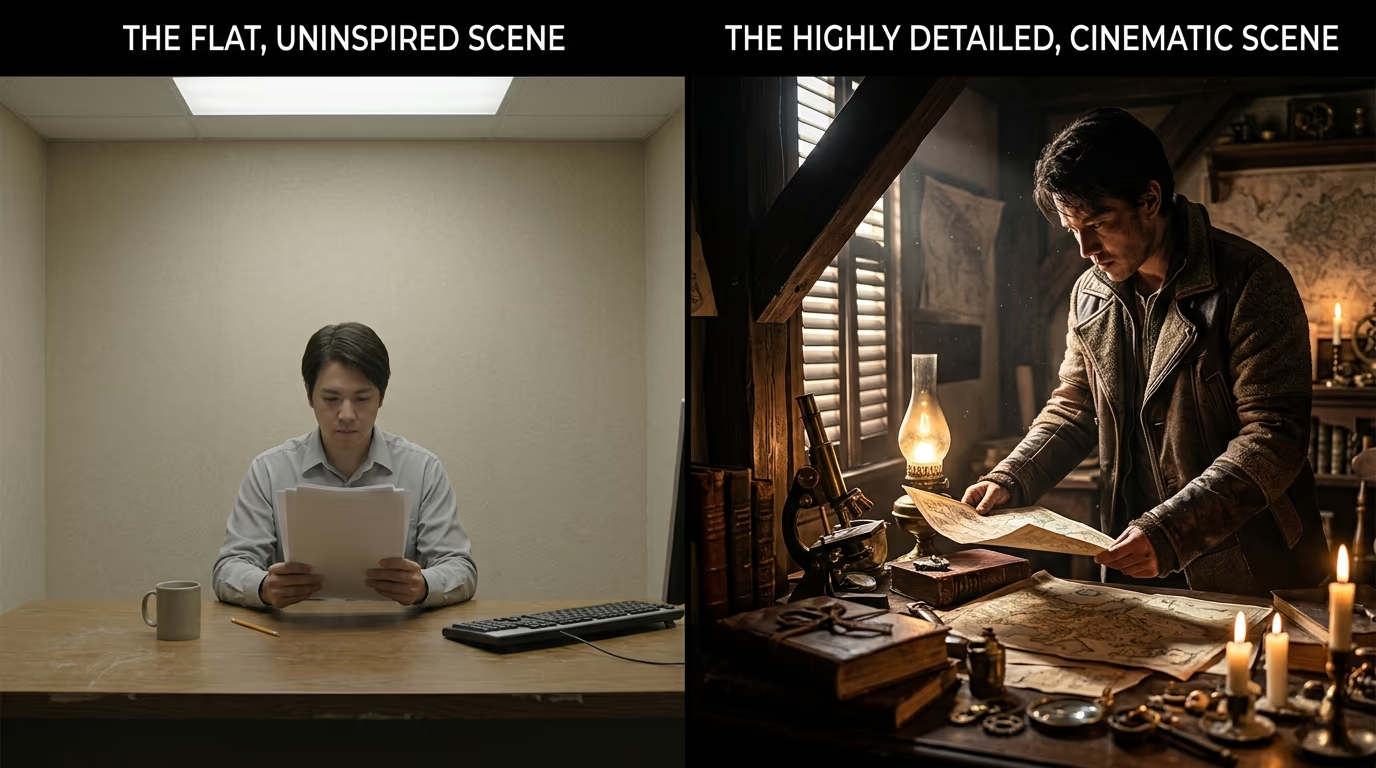
Many new users focus entirely on the subject and completely forget that a virtual camera is filming the scene. If you do not give camera instructions, the AI will usually just place a static camera far away from the action. This makes your creation look flat and lifeless. Always remember to direct the virtual lens.
Overcomplicating the Action
It is tempting to write an entire movie script into a single prompt. You might want to write a man walks into a diner, sits down at the booth, orders a coffee from the waitress, drinks it, and then looks out the window. That is too much for current models to handle all at once. The AI will get confused and mash all those actions together into a messy blob. Instead, focus on one single action per clip.
Handling the Weird Stuff When the AI Hallucinates
If you play around with these tools long enough, you will eventually see some very weird things. Maybe a person has six fingers, or a car suddenly melts into the road, or a dog turns into a cat halfway through the clip. In the tech world, we call these strange glitches hallucinations. They happen when the AI gets confused about physics or how objects are supposed to look in the real world.
Generative AI struggles the most with temporal consistency. This is a fancy way of saying that it has a hard time keeping objects looking exactly the same from one frame to the next.
Do not let this discourage you. Hallucinations are just a normal part of the process right now. The best way to fix them is to simplify your prompt. If your subject is melting or warping, try making your instructions shorter and more direct. Sometimes, less action is actually better. A beautiful, slow-moving portrait is often much more impressive than a messy, chaotic action scene that breaks the laws of physics.
Tips for Refining Your Art
The truth is that your first few videos might not look perfect, and that is completely fine. Digital creation is a journey of trial and error. Here are some extra tips to help you level up your skills quickly.
Keep a notebook or a digital document of the words that work well for you. When you find a combination that produces a great lighting effect or a smooth camera movement, save it! You can reuse that exact phrasing in your future projects to get consistent results.
Do not be afraid to study other creators. Many platforms have public feeds where you can see what other people are making. The best part is that you can often see the exact text they used to make it. Studying their word choices is one of the fastest ways to learn new techniques and improve your own skills.
Remember that editing is your best friend. AI is amazing, but it is not perfect. Sometimes you will get a clip that looks incredible for three seconds, and then it gets weird in the fourth second. Just put that clip into a simple video editing program and chop off the bad part. Combining several short, high-quality clips together is how the professionals make those jaw-dropping short films you see online.
Bringing It All Together Adding Audio and Music
Once you have mastered the visual side of your prompt and successfully generated your videos, there is one more crucial step to truly bring your creation to life. A silent scene can be visually stunning, but adding the right audio changes the entire experience. It makes the viewer feel like they are really stepping into the world you built.
When you are putting your project together, think about the environment you described. If you created a rainy city street, you need the sound of heavy drops hitting the pavement, the distant rumble of thunder, and perhaps the low hum of neon signs.
You can easily use free sound effect libraries to layer your project. Adding a cinematic music track underneath your clip will instantly make it feel ten times more professional. The visual elements build the world, but the audio gives it a heartbeat. This final polish is what will make people stop scrolling and truly pay attention to your work. It is an awesome feeling when the visuals and the music sync up perfectly to tell a complete story.
Creating a Community and Sharing Your Work
As you become more comfortable with this technology, you will realize that creation is much more fun when you share it with others. The artificial intelligence community is growing incredibly fast. There are thousands of groups, forums, and social media channels dedicated entirely to generative AI art.
Joining these communities is a fantastic way to stay motivated. When you share your videos online, you can get valuable feedback from other artists. They might point out a camera angle you never thought of, or suggest a new lighting style that fits your aesthetic perfectly. Plus, seeing the amazing things other people are creating with a simple prompt will constantly inspire you to push your own boundaries.
Do not be shy about sharing your early work, even if it has a few flaws or minor hallucinations. Everyone starts somewhere, and the community is generally very supportive of beginners who are just learning the ropes. You might even find collaborators who want to team up and create longer, more ambitious projects together. Embedding these videos onto your own website can also keep your visitors engaged for longer periods, naturally boosting the value of your site.
The Future is Bright
We are still in the very early days of this technology. The tools are getting faster, smarter, and more realistic every single month. Soon, we might be able to generate entire television episodes just by typing a few descriptive paragraphs. But no matter how advanced the technology gets, the human element will always be the most important part.
The AI is just a tool, much like a digital paintbrush. It still needs a creative artist to guide it. Your imagination, your storytelling skills, and your unique perspective are what will make your videos stand out from the crowd. The text box is just the bridge between your brilliant brain and the digital screen.
Final Thoughts
Diving into AI video creation is one of the most exciting things you can do right now. It unlocks a level of creative freedom that was completely impossible just a few short years ago. By understanding how to craft the perfect instructions, organizing your thoughts logically, and being patient with the learning curve, you will be producing amazing content in no time. So, open up a text box, let your imagination run wild, and start bringing your boldest ideas to life. The world is waiting to see what you create.",