
GoHighLevel Review: Honest Pricing and Features Guide
Choosing the right marketing platform is harder than it looks.
Most businesses do not want another tool that only solves one small problem. They want a system that helps them capture leads, follow up faster, book appointments, manage clients, send messages, collect reviews, and track sales without jumping between five different apps.
That is why this GoHighLevel review matters.
GoHighLevel, also known as HighLevel, is an all in one CRM and marketing automation platform built mainly for agencies, marketers, consultants, and service based businesses. It brings together CRM, funnels, websites, calendars, email, SMS, automations, payments, reviews, reporting, and client account management.
After reviewing its current features and pricing, our honest view is simple. GoHighLevel can be very powerful when you need a central system for lead generation and client follow up. But it is not the best fit for everyone. It has a learning curve, usage based costs, and more features than some small teams will actually need.
This GoHighLevel review will help you decide whether it is the right platform for your business.
What Is GoHighLevel?
GoHighLevel is a cloud based business and marketing platform that combines many tools into one dashboard.
Instead of paying separately for a CRM, landing page builder, appointment scheduler, email marketing tool, SMS platform, review software, funnel builder, and client reporting tool, GoHighLevel gives you one place to manage most of that work.
The platform is especially popular with marketing agencies because it allows them to create client accounts, manage campaigns, automate follow up, and even offer software under their own branding on higher plans.
In practical terms, GoHighLevel helps businesses answer important questions like these:
Where did this lead come from?
Has anyone followed up yet?
Did the lead book an appointment?
What stage is this deal in?
Can we send automated reminders?
Can we ask happy customers for reviews?
Can we build a funnel and connect it to our CRM?
Can we manage several clients from one agency dashboard?
For agencies and service businesses, that can save a lot of time.
Who Is GoHighLevel Best For?
GoHighLevel is best for users who care about leads, appointments, follow up, automation, and client management.
It is not only a CRM. It is more like a growth operations system for businesses that depend on conversations and booked calls.
Best Fit Users
GoHighLevel is a strong fit for:
Marketing agencies managing multiple clients
Local service businesses that need leads and appointments
Consultants and coaches selling through funnels and calls
Real estate professionals managing prospects and follow ups
Gyms, clinics, med spas, dental offices, and home service companies
Course creators who need funnels, payments, communities, and follow up
Agencies that want to resell software using SaaS mode
For example, a local roofing company could use GoHighLevel to capture leads from a landing page, send automatic SMS replies, book inspections, move deals through a pipeline, send review requests after jobs, and reactivate old leads before storm season.
A marketing agency could use the same platform to build separate accounts for each client, manage workflows, track calls, send reports, and keep all client data organized.
Who May Not Need It?
GoHighLevel may not be necessary if you only need a simple email newsletter tool, a basic website builder, or a lightweight contact database.
It may also feel overwhelming for solo creators who do not plan to use funnels, pipelines, SMS, automations, booking calendars, or client accounts.
If your business only needs a clean CRM for sales tracking, tools like HubSpot, Pipedrive, or Zoho may feel simpler. If you only need advanced email marketing, ActiveCampaign may be easier to focus on. If you only need a sales funnel builder, ClickFunnels may feel more direct.
GoHighLevel makes the most sense when you want many of these functions working together.
Key GoHighLevel Features
GoHighLevel includes a wide range of tools. Some are core features, while others may involve usage based charges or optional add ons.
Here are the main features that matter most in real business use.
CRM and Sales Pipelines
The CRM is the center of the platform.
You can store contacts, track conversations, manage opportunities, assign leads, and move deals through custom pipelines. This is useful for businesses that need to know exactly where each lead stands.
For example, a sales pipeline might include:
New lead
Contacted
Appointment booked
Proposal sent
Won
Lost
This makes follow up easier because your team can see what needs attention instead of searching through emails, spreadsheets, and text messages.
Website, Funnel, and Landing Page Builder
GoHighLevel includes tools for building websites, funnels, and landing pages.
This is helpful for campaigns where you need a simple page to collect leads, sell a service, promote a webinar, or book calls. You can connect forms, calendars, order forms, and automations directly to the page.
The builder is not as design focused as some dedicated website platforms, but it is practical for lead generation. Agencies will like that they can build and duplicate funnels for different clients.
Forms, Surveys, and Quizzes
Lead capture is one of the stronger parts of GoHighLevel.
You can create forms, surveys, and quizzes, then connect submissions to workflows. That means a new lead can automatically receive a text, enter an email sequence, get assigned to a pipeline, or trigger a task for a team member.
This works well for service businesses where speed matters. A lead who fills out a quote form can receive a reply within seconds.
Workflows and Automation
Automation is one of the biggest reasons people choose GoHighLevel.
Workflows let you build sequences based on triggers and actions. For example, when someone books an appointment, GoHighLevel can send confirmation messages, reminders, internal notifications, and follow up messages after the appointment.
Common automations include:
New lead follow up
Appointment reminders
Missed call text replies
No show follow up
Review request campaigns
Lead reactivation campaigns
Birthday or seasonal promotions
Long term nurture sequences
The workflow builder is powerful, but beginners should start simple. Too many automations created too quickly can become messy.
Email, SMS, Calling, and Unified Conversations
GoHighLevel brings conversations into one place.
The platform supports email marketing, SMS messaging, inbound and outbound calling, social messages, live chat, and other communication channels depending on setup and integrations.
This matters because many leads do not respond to one channel only. A lead may fill out a form, miss a call, reply by text, and later book through a calendar. Having that history in one conversation view helps teams respond with context.
SMS, phone, email usage, AI tools, and some communication features may involve usage based charges. This is important to understand before launching high volume campaigns.
Calendars and Appointment Booking
GoHighLevel includes booking calendars for calls, consultations, demos, services, and paid appointments.
You can connect calendars to funnels, websites, forms, and workflows. A lead can book an appointment, receive reminders, and move into a pipeline automatically.
This is very useful for agencies, consultants, clinics, coaches, real estate teams, and local service businesses.
Reputation Management and Review Requests
GoHighLevel includes online reputation management tools that help businesses request reviews from customers.
For example, after a completed appointment or purchase, the system can send a review request by SMS or email. Businesses can also use review widgets and automate follow ups.
This feature is valuable for local businesses because reviews often influence buying decisions.
Payments, Invoicing, and Offers
GoHighLevel includes payment related tools such as invoicing, estimates, order forms, upsells, paid calendars, and membership or course offers.
This makes it possible to collect payments directly from funnels or appointment flows. It is useful for coaches, consultants, service providers, agencies, and creators selling digital products.
Payment provider availability can vary by setup, so users should check what works best in their region and business model.
Courses, Communities, and Memberships
GoHighLevel also includes features for courses, communities, and paid content access.
This will not replace every advanced learning management system, but it can work well for agencies, coaches, and creators who want basic course delivery connected to CRM, email, SMS, payments, and funnels.
Reporting and Dashboards
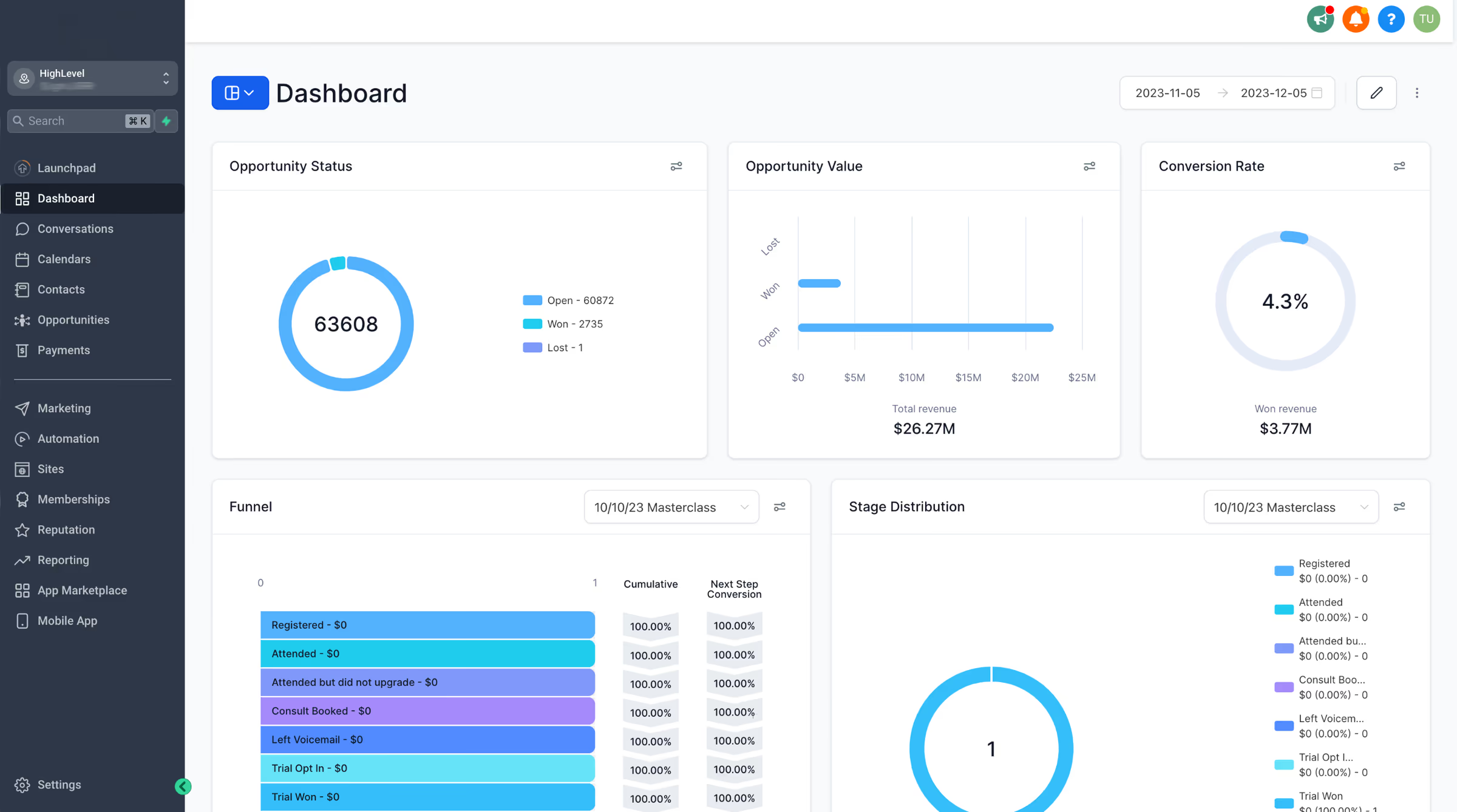
GoHighLevel offers dashboards and reporting tools to help users track leads, conversations, appointments, campaigns, and sales activity.
For agencies, reporting is important because clients want to see results. GoHighLevel can help bring campaign data into a more organized view.
That said, reporting quality depends heavily on setup. If tracking is not configured correctly, reports may not tell the full story.
AI Features
GoHighLevel has been adding AI across the platform, including tools related to conversations, voice, content, reviews, funnels, and customer interactions.
AI can be useful for speeding up replies, content creation, call handling, and lead engagement. However, AI features should not be treated as set and forget. They need human review, proper setup, and clear guardrails.
Some AI features may be included, while others may be part of paid add ons or usage based pricing. Users should check the current details before enabling AI at scale.
GoHighLevel Pricing and Plans
GoHighLevel currently offers three main public plans, plus an Enterprise option.
The public plans are Starter, Unlimited, and Agency Pro.
Plan | Monthly price | Annual price | Best for | Main limits and features |
|---|---|---|---|---|
Starter | $97 per month | $970 per year | Solo marketers, freelancers, smaller businesses | Includes 3 sub accounts, unlimited contacts, unlimited users, support, and core features |
Unlimited | $297 per month | $2970 per year | Growing agencies and teams managing several clients | Includes everything in Starter, unlimited sub accounts, rebilling phone and email without markup, and basic API access |
GoHighLevel also offers a 14 day free trial. Billing begins after the trial unless the account is cancelled before the trial ends.
Check GoHighLevel PricingImportant Pricing Notes
The subscription price does not always represent your full cost.
There may be usage based charges for services like phone numbers, SMS, calling, email sending, premium AI usage, and some third party services. Optional add ons can also increase the monthly cost.
Examples of current optional add ons include AI Employee plans, branded client portal app, dedicated email IPs, HIPAA compliance, online listings management, premium prospecting, premium support, SEO powered by Search Atlas, WhatsApp integration, white label mobile app, and WordPress hosting.
This does not mean GoHighLevel is overpriced. It means buyers should understand their expected usage before comparing it with other tools.
Which Plan Should You Choose?
For most small businesses or solo operators, Starter is the easiest place to begin because it includes the core platform and up to 3 sub accounts.
For agencies, Unlimited is usually the more practical plan because it allows unlimited sub accounts. If you manage several clients, the jump from Starter to Unlimited can make sense quickly.
Agency Pro is best when you want to sell GoHighLevel as your own software product using SaaS mode. It is not necessary for every agency, but it can be valuable if software resale is part of your business model.
Pros and Cons
No GoHighLevel review would be complete without looking at both sides.
Pros | Cons |
|---|---|
|
|
Real Use Cases
GoHighLevel works best when it is tied to clear business goals.
Here are some realistic examples.
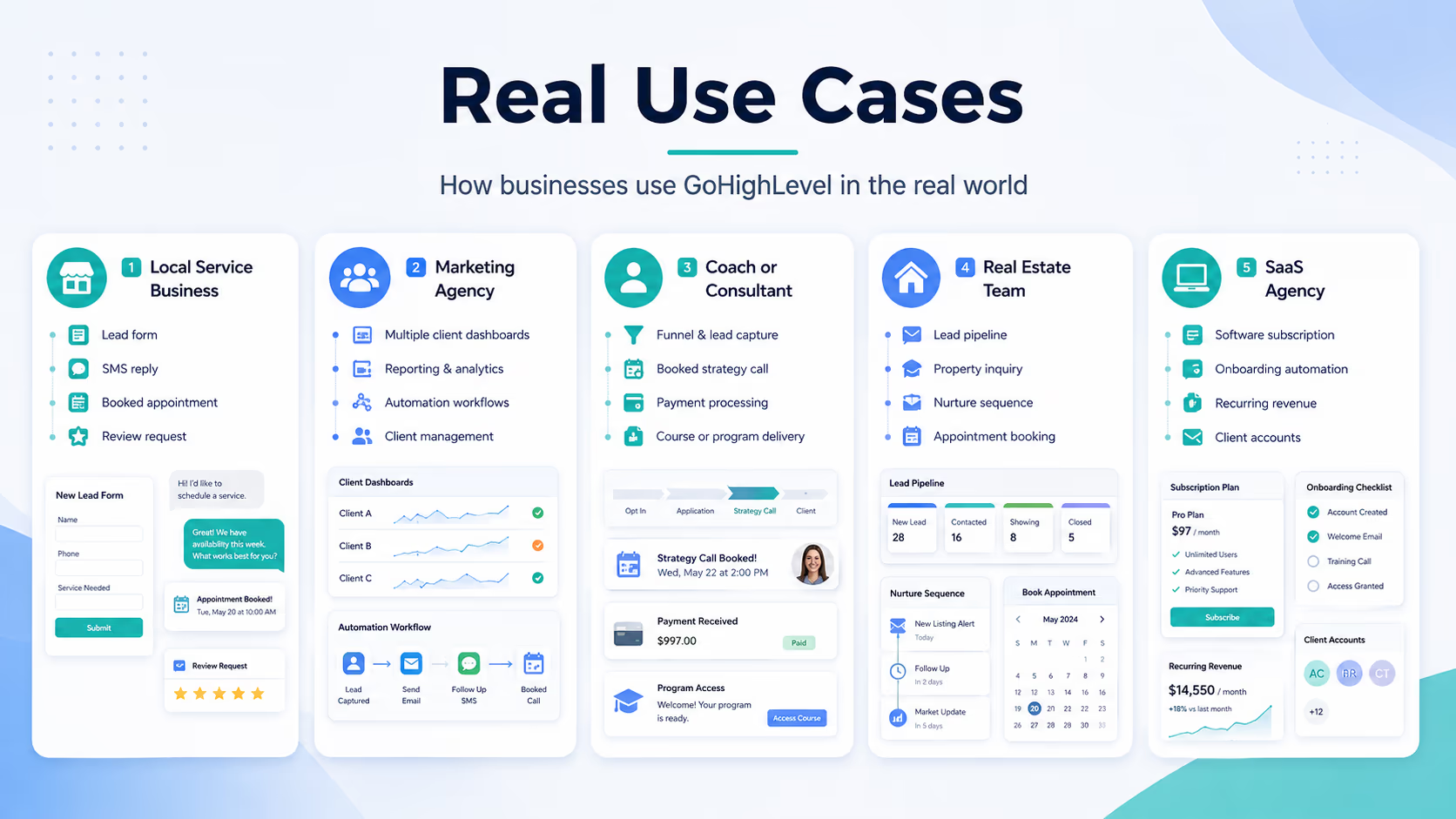
Local Service Business
A plumbing company can use GoHighLevel to collect leads from ads, send instant SMS replies, schedule service calls, remind customers about appointments, and request reviews after completed jobs.
The real value is speed. Many local leads choose the company that replies first.
Marketing Agency
An agency can create a separate sub account for each client. Each client can have its own CRM, funnels, calendars, workflows, phone numbers, and reporting.
This helps agencies avoid managing client work across disconnected apps.
Coach or Consultant
A coach can build a funnel, collect applications, send follow up messages, book strategy calls, collect payments, and deliver course content from the same platform.
This is especially useful for high ticket services where follow up matters.
Real Estate Team
A real estate team can capture buyer and seller leads, assign prospects to agents, send nurture sequences, create appointment reminders, and reactivate old leads.
The pipeline view helps the team see which prospects are ready for a call.
SaaS Agency
An agency using Agency Pro can package GoHighLevel as a software service for local businesses. With SaaS mode, the agency can create plans, onboard clients, and charge subscriptions.
This model is attractive, but it requires support, onboarding, and customer success. Selling software is not passive unless the agency has a good system.
User Experience
GoHighLevel is powerful, but it is not the simplest tool on the market.
The dashboard gives users access to many features, which is useful once you know where everything lives. At the beginning, it can feel like too much. A new user may need time to understand the difference between agency view, sub accounts, workflows, conversations, opportunities, calendars, funnels, and settings.
We think the best way to use GoHighLevel is to start with one business process.
For example:
Capture a lead
Send an automatic text
Create a pipeline opportunity
Book an appointment
Send reminders
Request a review after the service
Once that works, you can add more advanced workflows.
Trying to build everything at once is where many users get stuck.
What Makes GoHighLevel Different?
GoHighLevel is different because it was built with agencies and lead generation businesses in mind.
Many CRM platforms focus mainly on contact management. Many funnel builders focus mainly on pages. Many email tools focus mainly on campaigns.
GoHighLevel connects those pieces.
A lead can enter through a form, land in the CRM, receive a text, book an appointment, trigger a workflow, move through a sales pipeline, pay an invoice, join a course, and receive a review request later.
That connected flow is the main reason GoHighLevel stands out.
The second major difference is the agency model. Unlimited sub accounts, white label options, rebilling, and SaaS mode make it attractive for agencies that want to manage clients or sell software.
Possible Drawbacks
GoHighLevel is not perfect.
The biggest drawback is complexity. The platform includes many tools, and each one has settings. That is good for flexibility, but it also means users need a clear setup plan.
Another drawback is that some costs depend on usage. If you send a lot of SMS messages, make many calls, send high email volume, use premium AI, or enable multiple add ons, your monthly bill can rise beyond the base plan.
The third drawback is specialization. GoHighLevel does many things well, but dedicated tools may be better in specific areas. A dedicated website builder may offer more design control. A dedicated email platform may offer deeper email testing. A large enterprise CRM may offer more advanced governance and custom reporting.
So the question is not whether GoHighLevel is the best at every individual feature. The question is whether having the whole system in one place is more valuable for your business.
For many agencies and service businesses, the answer is yes.
GoHighLevel Compared With Alternatives
GoHighLevel competes with several types of tools, not just one.
GoHighLevel vs HubSpot
HubSpot is a polished customer platform with strong CRM, marketing, sales, service, and content tools. It is often a better fit for larger teams that want a refined CRM experience and deeper enterprise style structure.
GoHighLevel is usually more attractive for agencies and local businesses that want funnels, SMS, booking, automations, reputation management, and client sub accounts in one platform.
Choose HubSpot if you want a more traditional CRM ecosystem with a polished interface.
Choose GoHighLevel if you want agency focused automation, client accounts, funnels, and local business marketing tools.
GoHighLevel vs ClickFunnels
ClickFunnels is focused on building sales funnels and selling online. It is easier to understand if your main goal is to create landing pages, order forms, upsells, and simple sales flows.
GoHighLevel includes funnel building, but it also includes CRM, calendars, conversations, SMS, reputation tools, pipelines, client accounts, and agency features.
Choose ClickFunnels if funnels are your main need.
Choose GoHighLevel if you need funnels plus CRM and follow up automation.
GoHighLevel vs ActiveCampaign
ActiveCampaign is strong for email marketing and automation. It may be better for businesses that are mostly focused on advanced email campaigns, segmentation, and email based customer journeys.
GoHighLevel is broader. It combines email with SMS, calls, pipelines, booking, funnels, client accounts, and reputation management.
Choose ActiveCampaign if email marketing is your main priority.
Choose GoHighLevel if you need a wider sales and marketing operating system.
GoHighLevel vs Keap
Keap is built for small business CRM and automation. It can be a good choice for service based businesses that want sales and marketing automation without managing multiple client accounts.
GoHighLevel is stronger for agencies, white label use, funnels, multi client management, and SaaS mode.
Choose Keap if you want a small business CRM with automation.
Choose GoHighLevel if you are an agency or need broader marketing infrastructure.
Is GoHighLevel Worth It?
GoHighLevel is worth it if you will actually use the main features.
If you use the CRM, funnels, automations, calendars, SMS, email, reputation management, and client accounts, the platform can replace several separate subscriptions. In that case, the pricing can make sense.
But if you only need one or two features, it may be too much. Paying for a full platform when you only need simple email marketing or a basic landing page builder is not the smartest move.
The value depends on how much of the system you use.
Final Verdict
Our final verdict in this GoHighLevel review is that GoHighLevel is one of the most practical all in one platforms for agencies, marketers, consultants, and service based businesses that depend on leads, appointments, follow up, and client results.
It is especially strong for agencies because of sub accounts, automation, white label options, rebilling, and SaaS mode. It is also useful for local businesses that want faster lead response, better appointment booking, and more consistent review generation.
However, it is not a magic button. You still need strategy, setup, testing, and good follow up. The platform gives you the system, but your results depend on how well you use it.
Clear Recommendation
We recommend GoHighLevel for agencies, consultants, and local service businesses that want to bring CRM, funnels, automations, booking, messaging, payments, and reviews into one platform.
Start with the free trial, build one simple lead capture and follow up process, and test whether it fits your workflow before scaling.
Choose Starter if you are a solo marketer, freelancer, or small business that only needs a few sub accounts.
Choose Unlimited if you are managing multiple clients and want room to grow.
Choose Agency Pro if you want to sell software subscriptions through SaaS mode and build a recurring revenue model around the platform.
If your business is serious about lead generation and follow up, GoHighLevel is absolutely worth considering.
Explore GoHighLevel