
Best CRM Software for Small Businesses: Top 2026 Picks

Choosing the best CRM software can feel confusing at first. There are many CRM tools, many pricing plans, and many features that sound similar. Some platforms focus on sales. Some focus on marketing. Others try to do everything in one place.
For small businesses, the right choice is not always the biggest or most expensive platform. The best choice is the one your team will actually use every day.
In this review, we will look at what makes great CRM software for small businesses, what features matter, and how to pick the right customer relationship management system for your needs.

What Is CRM Software?
CRM stands for customer relationship management. In simple words, CRM software helps a business store, manage, and track customer information.
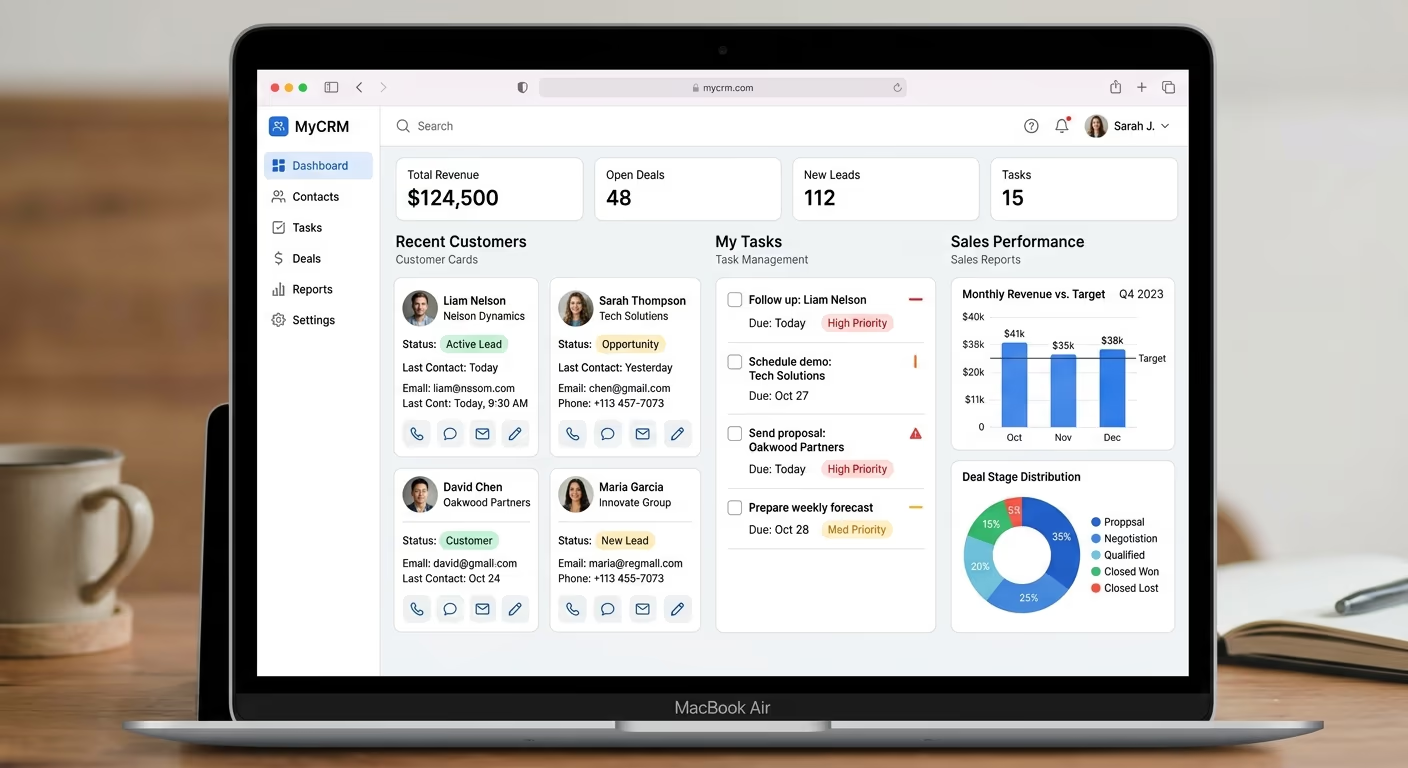
Instead of keeping customer details in notebooks, spreadsheets, emails, or separate apps, a CRM keeps everything in one place. You can see customer names, phone numbers, emails, deals, notes, follow-ups, and sales activity.
For a small business, this can make a big difference. It helps the team stay organized and avoid missed opportunities.
A good small business CRM can help you answer simple but important questions:
Who are our best leads?
Who needs a follow-up today?
Which deals are close to closing?
Which customers have contacted us before?
How much sales value is in our pipeline?
When a business grows, these questions become harder to manage manually. That is where CRM tools become useful.
Why Small Businesses Need CRM Software
Many small businesses start with spreadsheets. That can work for a while. But as more leads, customers, and team members are added, spreadsheets quickly become messy.
A CRM software platform gives your business a cleaner system. It helps you manage customer data, track sales, and keep communication more professional.
This is especially important for businesses that deal with leads, quotes, appointments, subscriptions, or repeat customers.
The best CRM software for small businesses should help with:
Customer records
Sales pipeline tracking
Lead management
Email follow-ups
Tasks and reminders
Reports and dashboards
Team collaboration
Basic automation
Current CRM comparison pages from Forbes Advisor and Salesforce show that small business CRM tools are often judged by affordability, mobile access, scalability, pipeline management, and ease of use.
What Makes the Best CRM Software?
The best CRM software is not only about having many features. A platform can have hundreds of features and still be a bad fit if it is too hard to use.
For small businesses, we believe the best CRM software should be simple, affordable, flexible, and easy to set up.
Here are the key things we look for as reviewers.
1. Ease of Use
A small business CRM should not require weeks of training. Your team should be able to add contacts, update deals, create tasks, and check reports without feeling lost.
A clean dashboard matters. Simple menus matter. Fast setup matters.
If your team avoids using the CRM, the software loses its value.
2. Contact Management
Contact management is the heart of customer relationship management. A good CRM should let you store customer names, emails, phone numbers, company details, notes, tags, and past activity.
This helps your team understand each customer better.
For example, if a customer calls again, anyone on your team should be able to see the history quickly.
3. Sales Pipeline Tracking
A sales pipeline shows where each deal stands.
For example:
New lead
Contacted
Proposal sent
Negotiation
Won
Lost
This gives your business a clear view of future sales. It also helps you see where deals are getting stuck.
CRM tools like Pipedrive are often known for visual pipeline management, while platforms like Salesforce Starter Suite and Zoho Bigin are commonly listed for small business sales tracking and budget-friendly CRM options.
4. Automation
Automation saves time by handling repeated tasks.
For example, CRM software can remind your team to follow up with a lead, send a welcome email, assign a contact to a sales rep, or update a deal stage.
Small businesses usually have limited time and staff. Automation helps them do more without hiring more people.
However, too much automation can feel complicated. The best CRM software should offer automation that is helpful, not overwhelming.
5. Reporting
Reports help you understand what is working.
A good CRM can show:
How many leads came in
How many deals were won
How much revenue is expected
Which team members are closing deals
Which sales stage has the most drop-offs
These reports help business owners make better decisions.
6. Integrations
Your CRM software should connect with tools you already use.
Common integrations include email, calendar, accounting software, forms, live chat, marketing platforms, and website tools.
This makes the CRM more powerful. It also reduces manual work.
7. Price
Price is a major factor for small businesses. Some CRM tools offer free plans. Others start with low monthly prices. Some advanced platforms become expensive as you add users, contacts, or features.
The best small business CRM is not always the cheapest. It should give good value for the money.
Forbes Advisor’s 2026 CRM coverage highlights budget-friendly options such as Bigin, while TechRadar’s recent reviews point to tools like Less Annoying CRM and Apptivo as affordable choices for smaller teams.
Best CRM Software for Small Businesses in 2026
There is no single CRM that is perfect for every business. The right choice depends on your size, budget, industry, and workflow.
Still, a few CRM tools are often strong choices for small businesses.
HubSpot CRM
HubSpot CRM is a popular choice for small businesses because it is easy to start with and offers a free entry point. It is useful for teams that want contact management, sales tracking, email tools, and marketing features in one ecosystem.
We like HubSpot for businesses that want a clean interface and room to grow. It can work well for startups, service businesses, agencies, and online businesses.
The possible downside is that advanced features can become expensive when your business grows.
Zoho CRM and Bigin
Zoho CRM is known for offering many features at a competitive price. Bigin, made by Zoho, is a simpler CRM built for smaller teams.
For a small business that wants affordable CRM software, Zoho and Bigin are worth considering. They can help with contact management, deal tracking, automation, and customer communication.
We like Bigin for teams that want a simple pipeline without too much clutter.
Forbes Advisor listed Bigin as a strong CRM choice for SMBs with a smaller software budget in its 2026 CRM software research.
Pipedrive
Pipedrive is a strong option for sales-focused teams. It is built around visual pipeline management, which makes it easy to see where each deal stands.
We like Pipedrive for businesses that care most about leads, follow-ups, and closing sales.
It may not be the best choice if you need deep marketing tools or advanced customer support features in the same system. But for sales teams, it is simple and clear.
Salesforce Starter Suite
Salesforce is one of the biggest names in CRM software. For small businesses, Salesforce Starter Suite can be a way to enter the Salesforce ecosystem without starting with a large enterprise setup.
We like Salesforce for businesses that plan to grow and need strong scalability.
The downside is that Salesforce can feel more complex than simpler CRM tools. Small teams should make sure they have enough time to set it up properly.
Salesforce’s own small business CRM guide lists Salesforce Starter Suite as a scalability-focused option, along with Pipedrive, Freshsales, Zoho Bigin, and Monday CRM for different small business needs.
Less Annoying CRM
Less Annoying CRM is made for simplicity. The name explains the idea well. It is designed for small teams that want basic CRM tools without a heavy learning curve.
We like it for solopreneurs, consultants, local businesses, and teams that do not need advanced automation.
TechRadar’s 2026 review describes Less Annoying CRM as a simple and affordable option for teams of 1–50 people, with contact management, pipeline tracking, calendar features, and human support.
How We Would Choose the Best CRM
If we were choosing CRM software for a small business, we would not start by asking, “Which CRM has the most features?”
We would ask:
What problem are we trying to solve first?
If the problem is messy customer data, we need strong contact management.
If the problem is missed follow-ups, we need tasks and reminders.
If the problem is poor sales visibility, we need pipeline tracking.
If the problem is too much manual work, we need automation.
If the problem is team confusion, we need a simple dashboard.
This approach helps avoid buying software that looks impressive but does not match the business.
Best CRM Software by Business Type
Different businesses need different CRM tools.
Best for Startups
Startups usually need a simple setup, low cost, and room to grow. HubSpot CRM, Zoho Bigin, and Pipedrive can be good starting points.
A startup should avoid overpaying for features it will not use yet.
Best for Service Businesses
Service businesses often need appointments, follow-ups, notes, invoices, and customer history. Keap, HubSpot, Zoho CRM, and Less Annoying CRM can be useful depending on the budget.
TechRadar’s 2026 Keap review notes that Keap combines CRM, appointment scheduling, invoicing, and marketing automation, making it more suitable for service-based businesses with higher-value leads.
Best for Sales Teams
Sales teams need pipeline tracking, lead management, reminders, and deal reports. Pipedrive, Salesforce Starter Suite, Freshsales, and Zoho CRM are strong options to compare.
Best for Very Small Teams
Very small teams usually need simplicity more than advanced features. Less Annoying CRM, Bigin, and HubSpot’s starter options can work well.
A small team should not choose a CRM that requires a full-time admin just to keep it running.
Common CRM Mistakes to Avoid
Choosing CRM software is not only about picking a good tool. It is also about using it the right way.
Here are common mistakes small businesses should avoid.
Choosing Too Many Features
More features can sound better, but they can also make the CRM harder to use. Start with the features you need now.
You can always upgrade later.
Not Training the Team
Even simple CRM tools need basic training. Everyone should understand how to add contacts, update deals, and log notes.
If the team does not use the system properly, reports will not be accurate.
Ignoring Mobile Access
Many small business owners and sales reps work outside the office. A good CRM should work well on mobile devices.
Mobile access helps your team update information quickly instead of waiting until later and forgetting details.
Not Cleaning Data
Bad data creates bad results. Duplicate contacts, old emails, and missing notes can make your CRM harder to trust.
Set a simple routine to clean your CRM data every month.
Picking Based on Price Only
Free CRM software can be great, but price should not be the only reason to choose a platform.
A cheap CRM that wastes time can cost more in the long run.
Our Reviewer Verdict
For most small businesses, the best CRM software is the one that balances ease of use, useful features, and fair pricing.
If your team wants a free or easy starting point, HubSpot CRM is a strong option.
If your team wants a budget-friendly small business CRM, Zoho Bigin is worth a close look.
If your team is focused mainly on sales pipeline management, Pipedrive is one of the clearest choices.
If your business wants long-term scalability, Salesforce Starter Suite may be a better fit.
If your team wants something simple and low-stress, Less Annoying CRM is a smart pick.
We would suggest starting with two or three CRM tools, testing their free trials or demos, and checking which one feels easiest for your team. The best CRM software should make work smoother, not more confuzing.
Final Thoughts
The right CRM software for small businesses can help you save time, manage leads, improve follow-ups, and build stronger customer relationships.
But the best CRM is not the same for every business.
Before choosing, think about your daily workflow. Look at your team size, sales process, budget, and customer needs. Then choose the CRM tools that fit your real problems.
A good customer relationship management system should help your business stay organized, close more deals, and give customers a better experience.
In 2026, small businesses have more CRM options than ever. That is good news. It means you do not have to force your business into the wrong system. You can choose CRM software that fits your goals, your team, and your future growth.