
Best Surfshark Alternative
Disclosure: Some links in this article may be affiliate links. If you purchase through them, we may earn a commission at no extra cost to you. Our reviews remain independent and are based on research, product information, pricing, features, and practical value for users.
Choosing the best Surfshark alternative usually means you are not just looking for another VPN. You are trying to decide whether Surfshark still fits the way you use the internet, or whether a competing service gives you better privacy, better value, better performance, or fewer compromises.
For many users, the strongest direct replacement is Proton VPN. It is a serious privacy focused VPN with a generous free plan, a large paid server network, open source apps, independent audits, Secure Core routing, NetShield, streaming support on paid plans, and strong appeal for people who already use Proton Mail, Proton Pass, or Proton Drive.
That does not mean Surfshark is suddenly a bad choice. Surfshark remains one of the easiest VPNs to recommend for families, shared households, and budget conscious users because it supports unlimited devices on one subscription and often has very aggressive long term discounts. It also bundles useful extras through Surfshark One and Surfshark One Plus.
Our early verdict is simple. Choose Proton VPN if privacy, transparency, a real free plan, Secure Core, open source apps, and a broader country list matter most. Choose Surfshark if you want the lowest long term price, unlimited device connections, simple apps, and a wider security bundle with antivirus, breach alerts, private search, Alternative ID, and data removal options.
This review compares features, pricing, ease of use, performance, integrations, support, drawbacks, security, privacy, user feedback, and overall value so you can decide which VPN actually fits your needs.
Quick comparison summary
Proton VPN and Surfshark are both strong consumer VPNs, but they are optimized for slightly different buyers. Proton VPN feels more focused on privacy, transparency, and the broader Proton ecosystem. Surfshark feels more focused on price, simplicity, unlimited device coverage, and all in one security tools.
Category | Proton VPN | Surfshark |
|---|---|---|
Best for | Privacy focused users, free VPN users, paid users who want strong transparency | Families, shared households, budget buyers, users with many devices |
Free plan or trial | Free plan with unlimited data, one device, medium speed, and limited server choice | Seven day trial on supported platforms, then paid plan with refund window |
Starting price | Free plan available. Paid VPN Plus commonly starts around $2.99 per month on the long term plan | Long term promotional pricing often starts around $1.99 to $2.49 per month depending on offer, region, currency, VAT, and coupon |
Main strength | Privacy credibility, open source apps, audits, Secure Core, strong free plan | Unlimited devices, low long term cost, simple apps, broad security bundle |
Main weakness | Paid plan costs more than Surfshark on many long term deals and only supports ten simultaneous devices | Renewal pricing can jump, and privacy positioning is strong but less transparent than Proton for users who value open source apps |
Ease of use | Clean apps, but some advanced privacy tools may feel more technical | Very beginner friendly with quick connect and simple navigation |
Key features | Secure Core, NetShield, VPN Accelerator, Stealth, Tor over VPN, P2P support, open source apps | CleanWeb, Bypasser, rotating IP, double VPN routing, Alternative ID, antivirus on higher plans, data removal on One Plus |
Integrations | Works best if you already use Proton Mail, Pass, Drive, Calendar, or Proton Unlimited | Works best if you want VPN plus security extras inside Surfshark One or One Plus |
Support | Priority support and live chat on paid plans | 24/7 support through live chat and email |
Best value for | Privacy focused users who want a free plan or Proton ecosystem bundle | Users protecting many devices at the lowest practical cost |
What Surfshark does
Surfshark is a consumer VPN and online security suite. Its core job is simple: it encrypts your internet connection, changes your visible IP address, and helps protect your browsing activity on public Wi Fi, home networks, and mobile connections.
People usually choose Surfshark because it is affordable, easy to set up, and unusually generous with device connections. A single paid subscription can cover unlimited devices, which is rare among major VPN providers. That makes it practical for families, roommates, small teams with light needs, and users who have phones, tablets, laptops, smart TVs, browser extensions, and maybe a router setup.
Surfshark also tries to be more than a VPN. Depending on the plan, it can include Alternative ID, CleanWeb, antivirus, private search, data breach alerts, and data removal through Incogni on One Plus. This makes it attractive for users who want a simple privacy and security bundle instead of paying for several separate tools.
Surfshark’s main strengths are:
Unlimited device connections | A major advantage for households and users with many devices |
Low promotional pricing | Long term plans are often cheaper than many premium competitors |
Simple apps | Most users can install it, tap quick connect, and move on |
Security extras | Higher plans add antivirus, breach monitoring, private search, and data removal tools |
Large enough server network | Surfshark lists more than 4,500 servers in 100 countries |
Some users may still want to replace Surfshark because of renewal pricing, privacy preferences, performance variation, discontinued Smart DNS support, plan complexity, or a desire for a provider with open source VPN apps and a stronger public privacy identity.
Explore SurfsharkWhat Proton VPN is
Proton VPN is a privacy focused VPN from Proton, the company behind Proton Mail, Proton Pass, Proton Drive, Proton Calendar, and other encrypted services. It helps users encrypt their traffic, hide their IP address, avoid unsafe networks, reduce tracking, access region based content when supported, and protect downloads through P2P friendly servers.
Proton VPN is not just trying to be the cheapest VPN. Its strongest pitch is trust. Its apps are open source, its no logs policy has been independently audited, and its free plan is unusually useful because it has no data limit and no ads.
The main audience for Proton VPN includes privacy focused users, journalists, travelers, activists, technical users, remote workers, students, and everyday users who want a VPN provider that puts privacy at the center of the product.
Proton VPN is also a natural choice if you already use Proton Mail or Proton Pass. Proton Unlimited can make sense when you want VPN, encrypted email, password management, cloud storage, calendar, and document tools under one account.
Explore Proton VPNWho each option is best for
User type | Best choice | Why |
|---|---|---|
Beginners | Surfshark | The apps are straightforward, the setup is simple, and the unlimited device model avoids account planning |
Privacy focused users | Proton VPN | Open source apps, audited no logs policy, Secure Core, and strong transparency make it more reassuring |
Budget conscious users | Surfshark | Long term promotional pricing is usually lower, especially for users with many devices |
Free VPN users | Proton VPN | The free plan has unlimited data, no ads, and no credit card requirement |
Small households | Surfshark | Unlimited simultaneous connections make it easier to protect everyone |
Remote workers | Depends | Proton VPN is better for privacy and business dedicated IP needs, while Surfshark is simpler for personal use |
Creators and streamers | Depends | Both can work, but streaming access varies by region, app, and service |
Torrent users | Proton VPN | Proton offers P2P support and port forwarding on supported setups, which can matter for advanced users |
Power users | Proton VPN | Secure Core, Tor over VPN, port forwarding, and connection profiles give more control |
Users who want a security bundle | Surfshark | Surfshark One and One Plus add antivirus, breach alerts, private search, and data removal options |
You may not need Proton VPN if your main priority is covering unlimited family devices at the lowest long term cost.
You may not need Surfshark if you only need one or two devices, care more about open source software, or want a strong free VPN.
Feature comparison
Server network
Proton VPN has the stronger server network on paper, with more than 20,000 servers in more than 140 countries on paid plans. That is excellent for users who travel, need more country choices, or want better odds of finding a nearby server outside North America and Western Europe.
Surfshark lists more than 4,500 servers in 100 countries. That is still broad enough for most users, and Surfshark’s network is strong for everyday browsing, travel, streaming attempts, and general privacy. The difference is that Proton currently offers a larger country footprint and many more total servers.
Winner: Proton VPN for server scale and country coverage.
Speed and performance
Both VPNs can be fast, especially when using modern protocols like WireGuard. In everyday use, the bigger difference is usually not the brand name but your location, the server you choose, the distance to that server, your internet provider, the protocol, and the device.
Surfshark is often very fast on nearby servers and is easy to use for quick browsing, streaming, and mobile use. Proton VPN has invested heavily in speed features such as VPN Accelerator and a large network, which can help with longer distance connections.
We would not recommend choosing only based on advertised speed. Test both on your actual devices, in your country, and with your most used websites. VPN speed can change by hour, region, and server load.
Winner: Tie for most users. Proton VPN may be better for users who need more country options and long distance consistency. Surfshark may feel faster and simpler for casual local connections.
Streaming support
Both VPNs are commonly used for streaming, but no VPN can guarantee that every streaming service will work all the time. Streaming platforms regularly block VPN traffic, and results can change quickly.
Proton VPN supports streaming on paid plans and is a strong choice if you want privacy plus media access. Surfshark is also widely used for streaming and has simple apps for phones, laptops, smart TVs, and browser based use.
A practical note: Surfshark discontinued its SmartDNS feature in 2026. That matters if you relied on SmartDNS for devices that do not support full VPN apps, such as some older smart TVs or consoles. You can still use Surfshark VPN apps and router based setups, but SmartDNS is no longer a reason to stay.
Winner: Tie for normal VPN app streaming. Proton VPN has the privacy edge. Surfshark has the easier household setup. Check your exact streaming services before committing.
Torrenting support
Proton VPN is the stronger choice for users who care about torrenting details. It has P2P servers, BitTorrent support, and port forwarding on supported setups. Port forwarding can improve connectivity for some P2P use cases.
Surfshark supports torrenting and is a good casual option, but advanced torrent users may miss port forwarding. If you only download occasionally and want a simple VPN, Surfshark is fine. If torrenting is a major reason you are buying a VPN, Proton VPN is easier to recommend.
Winner: Proton VPN.
Privacy and logging policy
This is one of the biggest reasons to consider Proton VPN as the best Surfshark alternative.
Proton VPN has a strong privacy identity. Its apps are open source, its no logs policy has been independently audited, and the company operates under Swiss privacy laws. Proton also publishes security and transparency information across its ecosystem.
Surfshark also has a no logs policy and has had independent verification of its no logs claims. It uses RAM only servers and has a broad trust center. For most everyday users, Surfshark’s privacy model is strong enough.
The difference is positioning and transparency. Proton VPN feels built primarily around privacy and public verifiability. Surfshark feels built around privacy plus affordability, convenience, and extra security products.
Winner: Proton VPN for privacy focused users. Surfshark is still strong for mainstream privacy.
Security features
Both providers cover the essentials: encryption, secure protocols, kill switch, DNS leak protection, and apps for major platforms.
Proton VPN adds Secure Core, which routes traffic through hardened servers in privacy friendly locations before sending it to the final VPN server. It also offers Stealth protocol for restrictive networks, Tor over VPN, NetShield, and open source apps.
Surfshark offers CleanWeb, kill switch, Bypasser split tunneling, rotating IP, double VPN routing, Alternative ID, and higher tier tools like antivirus, breach alerts, private search, and data removal through One Plus.
Winner: Proton VPN for privacy security. Surfshark for broader consumer security extras.
Device support
Surfshark wins clearly on simultaneous device connections. It allows unlimited devices on one paid subscription, which is a big advantage for families and heavy device users.
Proton VPN Plus allows up to ten simultaneous devices. That is enough for many individuals and couples, but it is not as generous as Surfshark. Proton Free supports one device at a time.
Both providers support major platforms such as Windows, macOS, Linux, iOS, Android, browsers, and some smart TV or router options. Exact feature availability can vary by platform, so check the apps you actually use.
Winner: Surfshark.
Apps and usability
Surfshark feels more beginner friendly. The interface is designed around quick connect, simple server selection, and easy access to common features. It is a good VPN for someone who does not want to think about protocols, profiles, or privacy routing.
Proton VPN has improved its apps and is also easy enough for normal use, but it includes more privacy oriented controls. Some users will appreciate that. Others may find Surfshark more direct.
Winner: Surfshark for beginners. Proton VPN for users who like more control.
Split tunneling
Split tunneling lets you choose which apps or traffic use the VPN and which apps connect normally.
Both VPNs offer split tunneling on supported platforms, but availability may differ by operating system. This matters because VPN features are often not identical across Windows, macOS, Android, iOS, Linux, and browser extensions.
Surfshark’s split tunneling is branded as Bypasser. It is easy to understand and useful when banking apps, work tools, or local devices do not behave well through a VPN.
Proton VPN also supports split tunneling on supported apps and platforms, and it fits well with more technical workflows.
Winner: Tie, with platform availability as the deciding factor.
Kill switch
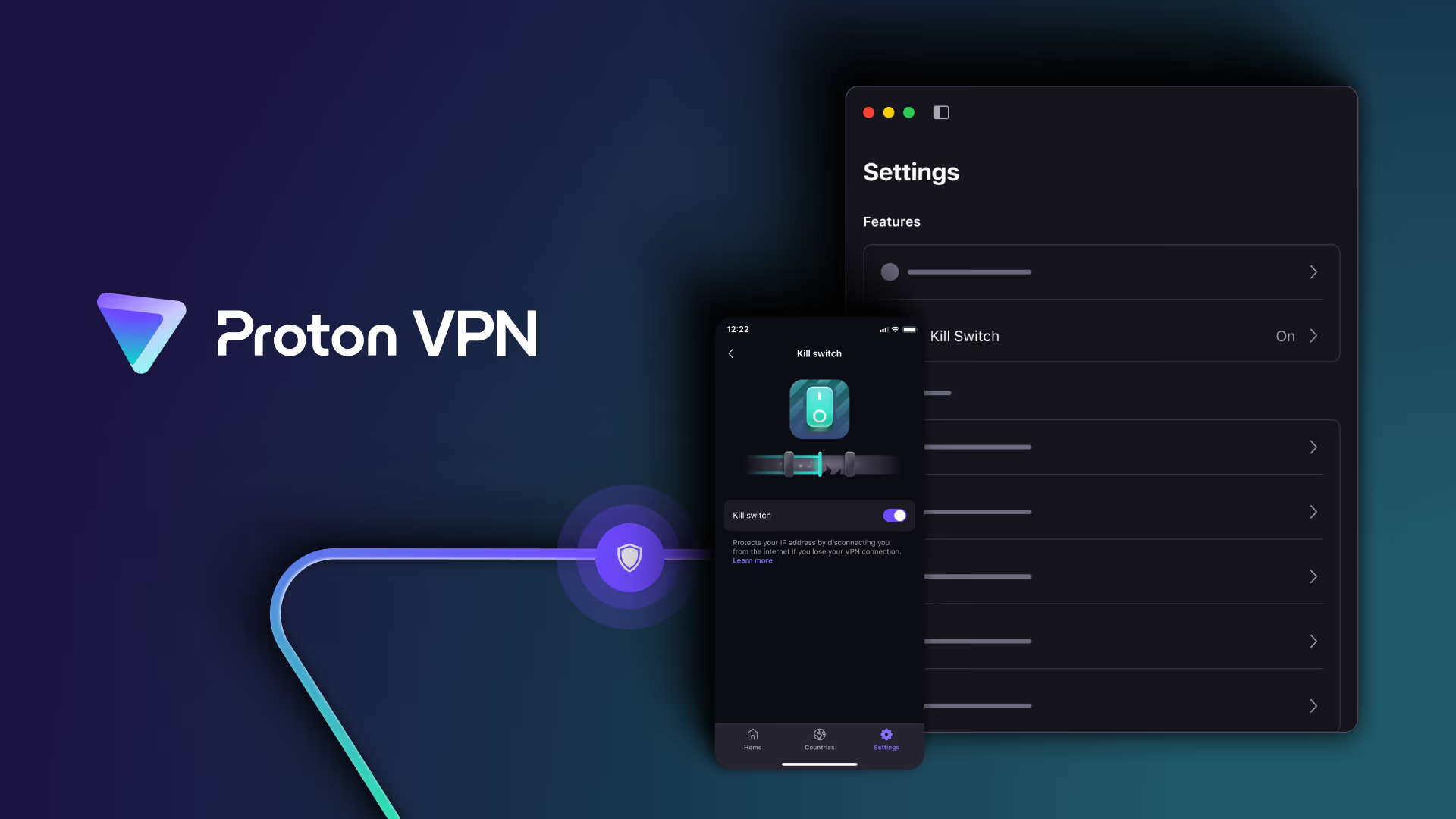
A kill switch blocks internet traffic if the VPN disconnects. This matters when you do not want your real IP address exposed during a connection drop.
Both Surfshark and Proton VPN offer kill switch features. In practice, users should test the kill switch on the exact device they use most, because behavior can vary by operating system and app permissions.
Winner: Tie.
Dedicated IP options
Surfshark offers Dedicated IP as an add on for personal users. It is useful if you need a consistent IP address for banking, work portals, fewer CAPTCHA checks, or remote access. Surfshark lists dedicated IP locations across multiple regions and prices the add on separately from the VPN plan.
Proton VPN offers dedicated IP addresses mainly through business plans. This is better suited for organizations that need IP allowlisting, secure access to internal resources, and dedicated gateways.
Winner: Surfshark for individual dedicated IP users. Proton VPN for business dedicated IP use.
Customer support
Surfshark has a strong support advantage for casual users because it advertises 24/7 support through live chat and email.
Proton VPN offers priority support and live chat on paid plans, while free users should expect more limited support options. Proton’s help center is useful, but users who want instant help at any hour may prefer Surfshark.
Winner: Surfshark for support availability. Proton VPN is fine for paid users who can use priority support.
Feature comparison table
Feature | Proton VPN | Surfshark | Better choice |
|---|---|---|---|
Free plan | Yes, unlimited data, one device, medium speed | No permanent free plan, but trial available on supported platforms | Proton VPN |
Simultaneous devices | Ten on VPN Plus, one on Free | Unlimited on paid plans | Surfshark |
Server network | More than 20,000 servers in more than 140 countries on paid plans | More than 4,500 servers in 100 countries | Proton VPN |
Streaming | Supported on paid plans | Supported through VPN apps, SmartDNS discontinued | Tie |
Torrenting | P2P support and port forwarding on supported setups | P2P friendly, but less advanced for torrent power users | Proton VPN |
Privacy transparency | Open source apps and independent audits | Audited no logs policy and RAM only servers | Proton VPN |
Security extras | Secure Core, Stealth, NetShield, Tor over VPN | CleanWeb, Bypasser, rotating IP, Alternative ID, antivirus on higher plans | Depends on need |
Dedicated IP | Business focused | Personal add on available | Surfshark for individuals |
Beginner experience | Good, but more privacy tools to understand | Very simple and direct | Surfshark |
Best ecosystem | Proton Mail, Pass, Drive, Calendar, and Proton Unlimited | Surfshark One, One Plus, Incogni, Alternative ID | Depends on existing tools |
Pricing and plans comparison
Pricing is one of the biggest differences between Proton VPN and Surfshark. Based on the current pricing shown, Surfshark is cheaper at the entry level, while Proton VPN is slightly more expensive but gives clearer paid billing options across monthly, yearly, and two year plans.
Surfshark is still the stronger value pick for users who want unlimited device coverage and a low paid price. Proton VPN remains the stronger choice for users who want a privacy focused VPN, a short monthly plan, or a provider with a strong free plan available separately from the paid pricing cards.
Pricing comparison table
Provider | Plan | Current price shown | Billing details | Money back guarantee | Best for |
|---|---|---|---|---|---|
Proton VPN | 2 year | $2.99 per month | Billed at $71.76 for the first 24 months, then renews at $83.88 every 12 months | 30 days | Users who want the best long term Proton VPN deal |
Proton VPN | 1 year | $3.49 per month | Billed at $41.88 for the first 12 months, then renews at $83.88 every 12 months | 30 days | Users who want Proton VPN without committing to two full years |
Proton VPN | 1 month | $4.99 per month | Billed at $4.99 every month | 30 days | Users who want short term VPN access without a long commitment |
Surfshark | Starter | From $2.49 per month | Promotional pricing shown. Final billing can depend on term, region, tax, and renewal rules | Check checkout page for current refund terms | Users who want the cheapest Surfshark plan with VPN, Alternative ID, and CleanWeb |
Surfshark | One | From $2.79 per month | Promotional pricing shown. Final billing can depend on term, region, tax, and renewal rules | Check checkout page for current refund terms | Users who want VPN protection plus antivirus, breach alerts, and private search |
Surfshark | One+ | From $4.49 per month | Promotional pricing shown. Final billing can depend on term, region, tax, and renewal rules | Check checkout page for current refund terms | Users who want the full Surfshark bundle with identity theft coverage and Incogni |
Proton VPN pricing explained
Proton VPN currently shows three paid billing choices. The best deal is the two year plan at $2.99 per month. It is billed at $71.76 for the first 24 months and then renews at $83.88 every 12 months. This is the best Proton option for users who know they want to keep the VPN long term.
The one year plan costs $3.49 per month. It is billed at $41.88 for the first 12 months and then renews at $83.88 every 12 months. This is a reasonable middle option for users who want a lower upfront commitment than the two year plan.
The monthly Proton VPN plan costs $4.99 per month and is billed every month. This is the most flexible option, but it gives less long term savings than the yearly and two year plans. Proton also shows a 30 day money back guarantee on the paid plans.
Surfshark pricing explained
Surfshark currently shows three main plans. Starter starts from $2.49 per month and includes the VPN, Alternative ID, and CleanWeb. It does not include antivirus, Alert, Search, identity theft coverage, or Incogni.
Surfshark One starts from $2.79 per month. It includes everything in Starter and adds antivirus, Alert for data breach monitoring, and Search for private browsing. It does not include identity theft coverage or Incogni.
Surfshark One+ starts from $4.49 per month. It includes the full set shown, including VPN, Alternative ID, CleanWeb, antivirus, Alert, Search, identity theft coverage up to $1M, and Incogni data removal.
Surfshark plan feature comparison
Surfshark feature | Starter | One | One+ |
|---|---|---|---|
VPN | Included | Included | Included |
Alternative ID | Included | Included | Included |
CleanWeb | Included | Included | Included |
Antivirus | Not included | Included | Included |
Alert | Not included | Included | Included |
Search | Not included | Included | Included |
Identity theft coverage up to $1M | Not included | Not included | Included |
Incogni data removal | Not included | Not included | Included |
Hidden costs and renewal factors
The cheapest monthly price usually depends on the subscription term. Proton VPN shows the clearest renewal information in the current pricing view. The two year plan renews at $83.88 every 12 months after the first 24 months, while the one year plan renews at $83.88 every 12 months after the first 12 months.
Surfshark shows lower starting prices, but users should check the checkout page carefully for the selected term, total upfront payment, tax, renewal price, and any optional add ons. Starter is the cheapest Surfshark option, but users who need antivirus, breach alerts, private search, identity theft coverage, or Incogni will need One or One+.
| Check Proton VPN Pricing | Check Surfshark Pricing |
|---|
Pricing note: Prices and promotions can change. Always check the final checkout page before subscribing.
Best value by user type
User type | Best value choice | Reason |
|---|---|---|
Lowest paid VPN price | Surfshark Starter | It starts from $2.49 per month and includes the core VPN features most casual users need |
Best Surfshark bundle value | Surfshark One | It costs only slightly more than Starter and adds antivirus, Alert, and Search |
Full identity protection bundle | Surfshark One+ | It adds identity theft coverage up to $1M and Incogni data removal |
Best Proton VPN long term deal | Proton VPN 2 year plan | It has the lowest Proton VPN monthly price shown at $2.99 per month |
Short term VPN access | Proton VPN 1 month plan | It costs $4.99 per month and does not require a long commitment |
Privacy focused users | Proton VPN | It costs more than Surfshark Starter, but the privacy features and transparency may justify the price |
Households with many devices | Surfshark | Surfshark remains the better value when unlimited device coverage matters |
Overall, Surfshark gives better paid value for users who want the lowest price and the broadest device coverage. Proton VPN gives better value for users who care more about privacy, flexible monthly billing, and clear long term renewal details.
Ease of use and user experience
Surfshark is easier for most beginners. The app is clean, the quick connect button is obvious, and the unlimited device policy removes a common source of friction. You do not have to decide which devices deserve protection. You can install it everywhere.
The dashboard is simple enough for daily use. Server lists are easy to browse, settings are not buried too deeply, and features like CleanWeb, Bypasser, and Alternative ID are presented in a friendly way.
Proton VPN is also user friendly, but it feels more like a privacy tool than a general security bundle. The app gives you more privacy context, server details, profiles, Secure Core options, and advanced settings. This is useful if you care about how your connection is routed. It can feel slightly more complex if you just want a simple on and off VPN.
For onboarding, both are easy. Surfshark has the smoother first day experience for nontechnical users. Proton VPN has the stronger long term experience for users who want to understand and control privacy settings.
Performance and reliability
VPN performance is difficult to judge universally because it depends on your region, internet provider, device, protocol, server distance, server load, and the websites or apps you use.
In normal use, both Proton VPN and Surfshark are fast enough for browsing, video calls, streaming, online shopping, and public Wi Fi protection. Proton VPN has a larger paid server network and speed focused technology, which can help users who need more location choice. Surfshark is quick to connect and performs well for common everyday tasks.
Connection reliability can vary. Some users report occasional slow servers or connection drops with almost every VPN provider. The practical solution is to test your most used locations during the refund window or free plan period.
For streaming, do not assume any VPN will unblock every library forever. Streaming platforms change their blocking methods regularly. A VPN that works today may need a different server tomorrow.
For business critical work, neither consumer VPN should replace a proper business VPN, zero trust access platform, or managed network security setup.
Integrations and ecosystem
Proton VPN fits best inside the Proton ecosystem. If you use Proton Mail, Proton Pass, Proton Drive, or Proton Calendar, Proton VPN feels like part of a larger privacy stack. Proton Unlimited can reduce tool sprawl by putting several privacy services under one account.
Surfshark fits best as a consumer security bundle. Surfshark One and One Plus are more about combining VPN, antivirus, leak alerts, private search, Alternative ID, and data removal. It is less of a productivity ecosystem and more of a personal security toolkit.
Both services support major operating systems and browsers. Both have mobile apps. Both support router style use cases through manual setup, although router setup always takes more effort than installing a normal app.
Before switching, check your actual workflow. That includes your browser, phone, laptop, smart TV, router, work tools, banking apps, streaming apps, and any country specific services you rely on.
Customer support and learning resources
Surfshark has the simpler support story for most users because it offers 24/7 help through live chat and email. That is useful when a server does not work, a streaming service blocks a connection, or a beginner needs setup help.
Proton VPN offers support resources, documentation, and priority support with live chat on paid plans. Its help center is strong, and the company explains privacy topics well. Free users should expect less direct support than paid users.
Both providers offer setup guides, troubleshooting articles, and account management help. Surfshark is better for users who want immediate support availability. Proton VPN is better for users who like detailed privacy documentation and technical explanations.
Security, privacy, and trust
A VPN provider sits between you and the internet, so trust matters. You should not choose a VPN only because it has a cheap offer or a large discount.
Proton VPN is one of the strongest Surfshark alternatives for trust. Its apps are open source, its no logs policy has been independently audited, and its privacy messaging is consistent across Proton’s wider product ecosystem. Secure Core is also useful for people who want stronger protection against network based attacks or risky jurisdictions.
Surfshark also has strong security credentials. It uses RAM only servers, has an audited no logs policy, offers modern VPN protocols, includes a kill switch, and provides additional safety tools through its paid bundles. For most mainstream users, Surfshark is secure enough and easier to manage.
The difference is that Proton VPN is better for users who want privacy verifiability as the main product identity. Surfshark is better for users who want good VPN privacy plus convenient security extras.
User reviews and real experiences
User reviews are mixed across the VPN industry, so we should treat them as patterns rather than final proof.
Common positive patterns for Surfshark include good value, easy setup, many device connections, and helpful support. Common complaints include slower servers in some regions, renewal pricing surprises, occasional streaming issues, and frustration when users expect every feature to work identically on every platform.
Common positive patterns for Proton VPN include trust, privacy reputation, strong free plan, clean apps, and good paid performance. Common complaints include connection issues for some users, support frustrations, plan confusion, and occasional feature differences between platforms.
The most important lesson from real user feedback is this: test a VPN in your actual environment. Your country, internet provider, router, phone, laptop, and work tools matter more than a global average score.
Pros and cons
Tool | Pros | Cons |
|---|---|---|
Proton VPN | Excellent free plan with unlimited data. Strong privacy reputation. Open source apps. Independent audits. Large paid server network. Secure Core and Stealth. Good choice for Proton ecosystem users. | Paid plan is usually more expensive than Surfshark promotions. Ten device limit on VPN Plus. Free plan has one device and limited server choice. Some advanced settings may feel technical. |
Surfshark | Unlimited devices. Low long term promotional pricing. Beginner friendly apps. Strong security features. Useful bundles with antivirus, alerts, private search, Alternative ID, and data removal. | Renewal prices can rise. No permanent free plan. SmartDNS has been discontinued. Some advanced users may miss port forwarding. Privacy transparency is strong but less open source centered than Proton. |
Real use cases
You want a free VPN that is actually usable
Choose Proton VPN. The free plan has unlimited data, no ads, and no credit card requirement. It is limited, but it is far more practical than most free VPNs that cap data or rely on advertising.
You want one subscription for your whole household
Choose Surfshark. Unlimited device connections are the main reason. You can protect phones, laptops, tablets, browsers, and smart TV devices without counting slots.
You already use Proton Mail
Choose Proton VPN, or consider Proton Unlimited. The value improves when VPN is part of a wider encrypted email, password, calendar, and storage setup.
You want the cheapest paid VPN for many devices
Choose Surfshark Starter. For pure device coverage per dollar, Surfshark is hard to beat during long term promotions.
You torrent often
Choose Proton VPN. P2P servers and port forwarding support on supported setups make it a better fit for serious torrent users.
You want identity and device protection extras
Choose Surfshark One or One Plus. Proton VPN is stronger as a privacy VPN, but Surfshark gives more consumer security extras in one place.
You work with sensitive research or journalism
Choose Proton VPN. Secure Core, open source apps, audits, and Proton’s broader privacy posture make it the better fit.
You mainly stream and browse
Either can work. Surfshark is easier for households. Proton VPN is better if you also want stronger privacy controls. Test your preferred streaming services before committing.
What makes each tool different
Surfshark is optimized for convenience and value. Its strongest message is simple: protect everything you own without paying per device. The product is practical, simple, and affordable, especially on long term plans.
Proton VPN is optimized for privacy and trust. Its strongest message is also simple: use a VPN from a company built around privacy, open source apps, independent audits, and a broader encrypted ecosystem.
That difference matters. Surfshark feels like a smart purchase for normal households. Proton VPN feels like the safer choice for people who think carefully about who runs their VPN and how transparent that provider is.
Possible drawbacks
Proton VPN drawbacks
Proton VPN is not the cheapest paid option. If you need to protect fifteen devices, Surfshark will usually be simpler and cheaper. Proton Free is excellent, but it is still limited to one device with reduced location control. Some users may also find Proton’s privacy features more complex than necessary for casual browsing.
Surfshark drawbacks
Surfshark’s promotional pricing can make the first term look very cheap, but renewal pricing may be higher. Its plan lineup can also feel confusing because Starter, One, One Plus, Dedicated IP, Alternative Number, and related tools may not all be included in the same way. SmartDNS discontinuation also matters if you used that feature for streaming devices that do not support VPN apps.
Best alternative options besides Proton VPN
Proton VPN is our top Surfshark alternative for privacy focused users, but it is not the only option.
NordVPN
NordVPN is a strong choice if you want a polished premium VPN with excellent streaming support, fast speeds, advanced threat protection on higher plans, and a strong reputation. It is often more expensive than Surfshark, but it is a good middle ground between ease of use and premium features.
Mullvad
Mullvad is best for users who want simple, transparent pricing and strong anonymity. It charges a flat monthly price and does not require an email address. It is less attractive for streaming and people who want a polished consumer security bundle.
ExpressVPN
ExpressVPN is a good option for users who want a premium, simple VPN with broad platform support and a polished experience. It is usually more expensive than Surfshark and Proton VPN, but beginners often like its simplicity.
Private Internet Access
Private Internet Access is worth considering for users who want customization, open source apps, and low long term pricing. It may appeal more to advanced users than beginners.
Which one offers better value
Surfshark offers better value for households, families, and users with many devices. Unlimited device connections are a real advantage, and the long term promotional prices are often lower than Proton VPN’s paid plans.
Proton VPN offers better value for privacy focused users, free VPN users, and people already inside the Proton ecosystem. The free plan is genuinely useful, and Proton Unlimited can replace multiple tools if you want encrypted email, VPN, password management, storage, and calendar services together.
For most paid VPN buyers, the value question comes down to this:
If you want the lowest cost per device, Surfshark wins.
If you want the strongest privacy focused Surfshark replacement, Proton VPN wins.
If you want a free VPN, Proton VPN wins.
If you want antivirus and data removal bundled with your VPN, Surfshark wins.
Final verdict
Proton VPN is the best Surfshark alternative for users who are leaving Surfshark because they want stronger privacy transparency, open source apps, a real free plan, a larger paid country network, Secure Core, and a tighter fit with privacy focused tools.
Surfshark is still the better choice for users who are happy with it and mainly care about affordability, unlimited device connections, simple apps, and extra security tools in Surfshark One or One Plus.
We would not tell every Surfshark user to switch. If Surfshark is fast in your region, works with your streaming apps, and covers all your devices at a good price, it still makes sense. But if you want a more privacy centered VPN with a meaningful free tier and a stronger transparency story, Proton VPN is the more compelling replacement.
Clear recommendation
Choose Proton VPN if you want the best Surfshark alternative for privacy, open source apps, a strong free plan, Secure Core, P2P support, and the Proton ecosystem.
Choose NordVPN if you need a premium all round VPN with strong streaming, fast speeds, and advanced security features.
Choose Surfshark if you still prefer unlimited devices, very low long term pricing, beginner friendly apps, and a VPN bundled with consumer security tools.
Consider another alternative if you need flat transparent pricing, anonymous account creation, enterprise access controls, or a VPN mainly for streaming on unsupported smart TV devices.
| Explore Proton VPN | Explore Surfshark |
|---|