
Canva AI Review 2026: Creator Tool to Beat
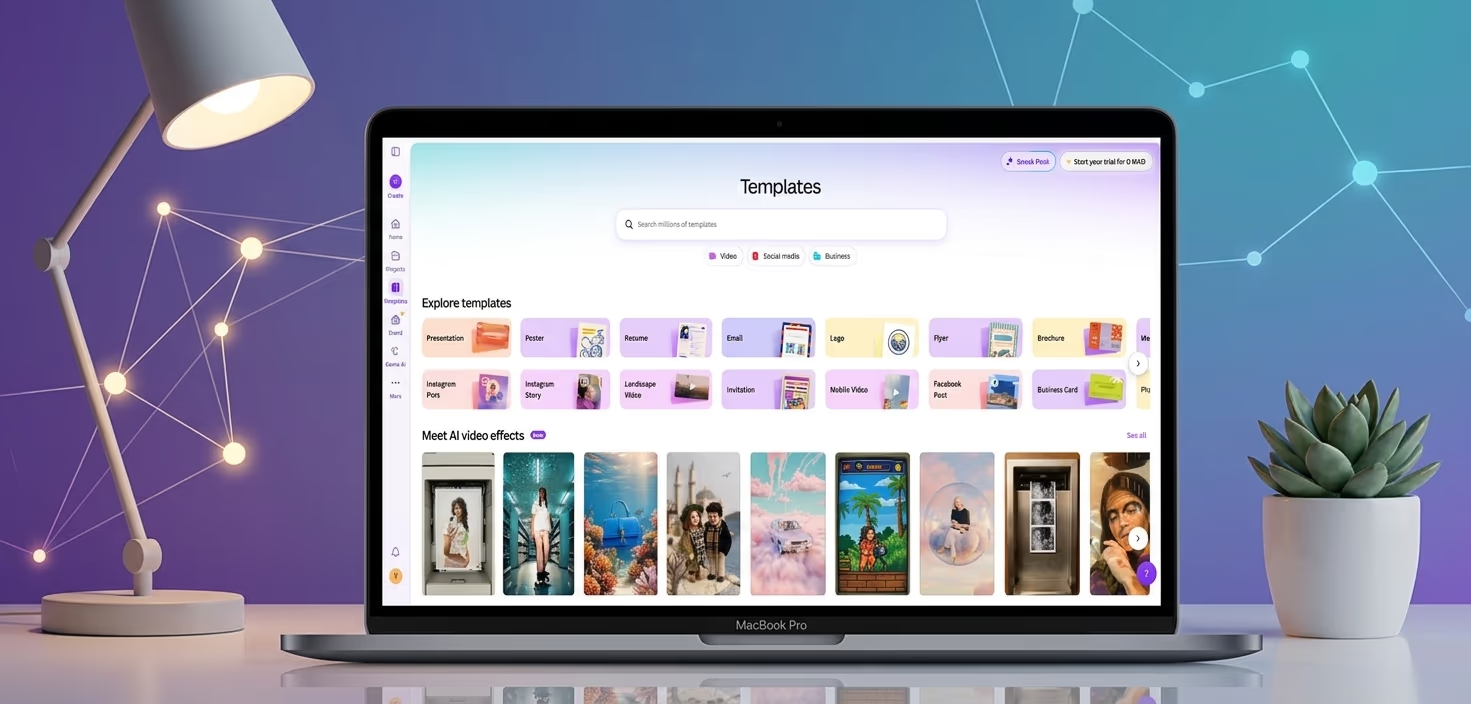
Canva has always been known as one of the easiest design tools for people who are not professional designers. It helped millions of users create social media posts, presentations, flyers, logos, posters, and simple videos without needing advanced skills.
Now, Canva is moving into a bigger space.
With Canva AI, the platform is no longer just a drag-and-drop design editor. It is becoming an AI media production tool for creators, marketers, small businesses, teachers, and teams.
In this Canva AI review, we will look at what the tool does well, where it still feels limited, and whether it is worth using in 2026.
We will also cover Canva Magic Studio review, Canva AI video generator, Canva AI pricing, and a simple Canva AI vs Adobe Firefly comparison.
The goal is simple: to help you decide if Canva AI is the right creative tool for your work.
What Is Canva AI?
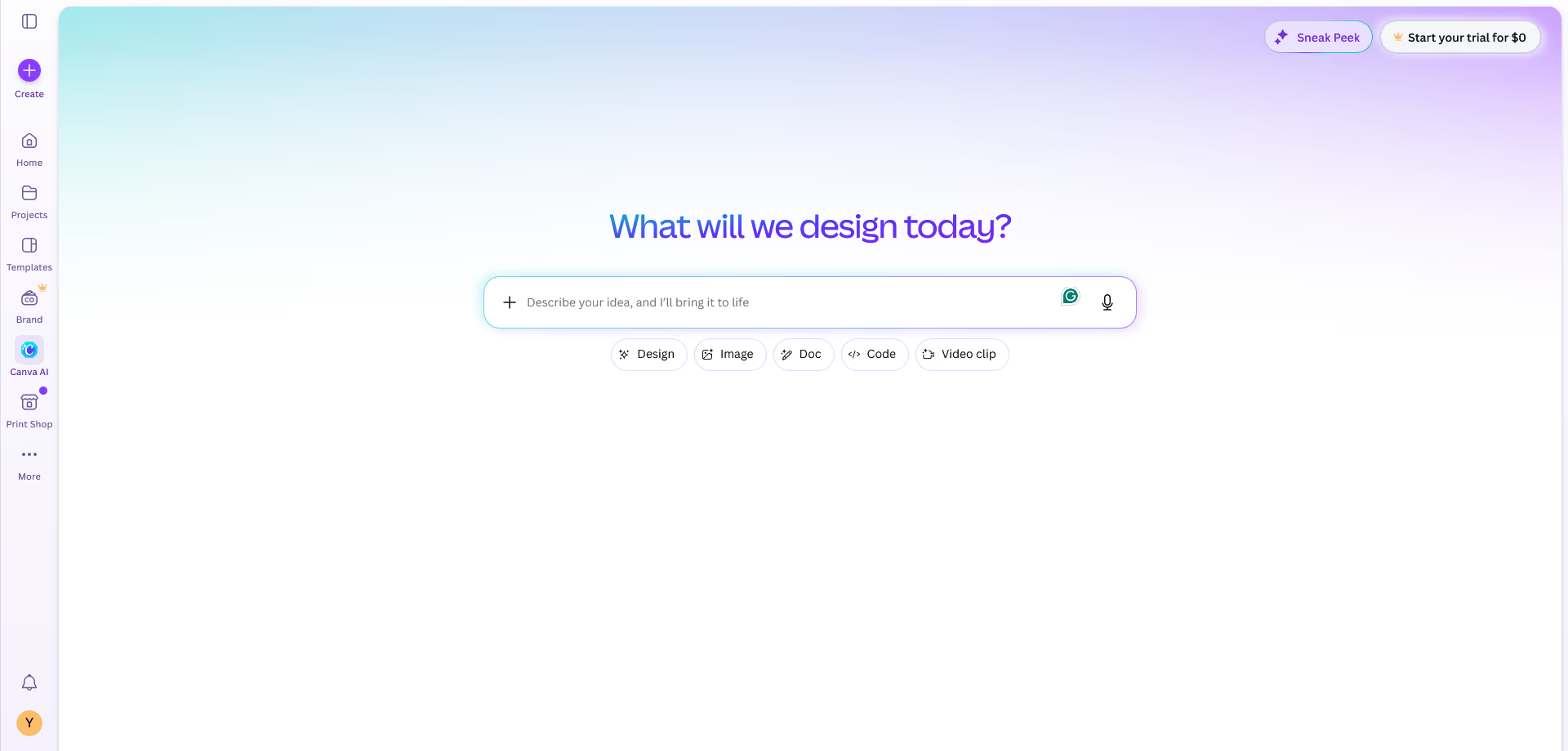
Canva AI is a set of artificial intelligence tools built into Canva. These tools help users create, edit, write, resize, translate, and improve media content faster.
Instead of opening separate tools for design, writing, video editing, image generation, and brand assets, Canva brings many of these features into one workspace.
Most of the AI tools are found inside Canva Magic Studio.
Magic Studio includes tools for AI design, image generation, text writing, video creation, photo editing, background removal, content resizing, and more.
In simple words, Canva AI helps users move from an idea to a finished design much faster.
For example, you can type a prompt and ask Canva to create a social media post, presentation, ad graphic, or video concept. Then you can edit the result with Canva’s normal design tools.
This makes Canva AI useful for people who need content often but do not want to start from a blank page every time.
Who Should Use Canva AI?
Canva AI is best for people who need fast, good-looking content.
It is especially useful for:
Content creators
Social media managers
Bloggers
YouTubers
Small business owners
Online coaches
Teachers
Freelancers
Startup teams
Marketing departments
A small business can use Canva AI to create product posts, flyers, sale banners, email graphics, and short videos.
A YouTuber can use it for thumbnails, channel banners, video assets, and promotional posts.
A blogger can use it for featured images, Pinterest pins, lead magnets, and simple infographics.
A marketing team can use it to build campaign ideas, branded templates, and social content for different platforms.
This is why this Canva AI review focuses mostly on everyday creative work. Canva AI is not only for designers. It is for anyone who needs to produce media quickly.
Canva AI 2.0: What Makes It Interesting?
Canva AI 2.0 makes the platform more powerful than before.
Older AI tools often create flat results. You type a prompt, get an image or a design, and then you have limited control over the final output.
Canva AI 2.0 is more useful because it focuses on editable designs. That means users can change layers, text, images, colors, and objects after the design is generated.
This is important.
A flat AI image may look nice, but it can be hard to customize. An editable design is more practical for real content work.
For example, you can ask Canva AI to create a product launch graphic. After the design appears, you can change the headline, move the product image, adjust the colors, add your logo, and resize the design for Instagram, LinkedIn, or a website banner.
That makes the workflow smoother.
Canva AI 2.0 also adds smarter creative help, such as conversational design, object-based editing, memory, brand tools, app connections, and better campaign support.
This makes Canva feel less like a basic design tool and more like a creative assistant.
It is not perfect, but it is clearly moving in the right direction.
Canva Magic Studio Review
A strong Canva Magic Studio review should focus on how much time it can save.
Magic Studio is the main AI area inside Canva. It includes tools that help with design, writing, image editing, video creation, and content conversion.
One of the most useful tools is Magic Design.
Magic Design can create design drafts from a prompt or uploaded media. You can use it for social posts, presentations, short videos, and other visual content.
This is helpful when you know what you want but do not know how to design it from scratch.
Magic Write is Canva’s AI writing tool. It can help create captions, headlines, short descriptions, summaries, and quick text for designs.
It is not a full replacement for a professional writer, but it is useful for first drafts.
Magic Switch is another helpful feature. It can resize and reformat content for different uses. For example, you can turn one design into formats for Instagram, Facebook, LinkedIn, and presentations.
This saves a lot of manual work.
Canva also includes AI tools for image editing. You can remove backgrounds, expand images, erase unwanted objects, and adjust parts of a design.
For everyday use, Magic Studio is easy and practical.
The only issue is that the first result may look a little generic. You still need to edit the design to make it match your brand.
But as a starting point, Magic Studio is very useful.
Best Canva AI Features
The best thing about Canva AI is not one single feature. It is the full creative workflow.
You can brainstorm, design, write, edit, resize, and export in the same place.
That is a big advantage.
Here are the features we think matter most.
AI Design Generation
Canva AI can create design drafts from text prompts. This is useful when you need a quick concept for a post, ad, flyer, presentation, or campaign.
Instead of spending 30 minutes choosing layouts, colors, and fonts, you can start with an AI-generated version and improve it.
This helps reduce the blank-page problem.
AI Image Tools
Canva can generate images and help edit existing photos.
You can create visual ideas, remove backgrounds, erase objects, and expand images when the frame is too small.
These tools are useful for social content, product posts, thumbnails, and simple marketing graphics.
They are not as advanced as professional photo editing tools, but they are much easier to use.
AI Writing Help
Magic Write can help with captions, headlines, short paragraphs, and quick copy ideas.
This is helpful when you need text for a poster, Instagram post, ad, or presentation slide.
The writing still needs editing, becuase AI text can sometimes sound too basic. But it is a good starting point.
Brand Tools
Canva’s brand features help users keep colors, fonts, logos, and templates consistent.
This is very important for businesses.
Without brand control, AI content can quickly look random. Canva helps keep your designs closer to your visual style.
Team Collaboration
Canva is also strong for teams.
Users can share designs, leave comments, build templates, and work together inside the same workspace.
This makes Canva AI useful for marketing teams, agencies, schools, and small businesses.
Canva AI Video Generator Review
The Canva AI video generator is good for short and simple video content.
It is not made to replace advanced video editing software. It is made to help users create quick videos for social media, ads, presentations, and campaigns.
You can use Canva AI video tools for:
Instagram Reels
TikTok clips
YouTube Shorts
Product teasers
Simple promo videos
Animated social posts
Short educational clips
The biggest benefit is convenience.
You can generate or build a video, add text, insert music, use templates, apply brand colors, and resize the video for different platforms.
That is very useful for creators and marketers.
However, the Canva AI video generator is not the best tool for cinematic video. If you need realistic movement, advanced camera control, long scenes, or professional film-style output, other AI video tools may be stronger.
But for quick media production, Canva does a good job.
This is one of the reasons many creators may choose Canva over more complex platforms. It is not always the most advanced, but it is often the easiest.
Design Quality: How Good Are the Results?
The design quality is usually strong enough for everyday content.
Canva AI can create clean, modern, and attractive designs. The results often work well for social posts, presentations, ads, blog graphics, posters, and simple business materials.
The real value is speed.
Canva AI gives you a useful first draft. You can then adjust it to match your style.
This is better than starting with nothing.
Still, the design quality depends on your prompt and your edits. If your prompt is too simple, the result may feel plain. If you use the first output without changes, the design may look similar to other Canva templates.
To get better results, you should add clear details.
For example, instead of writing “make a social media post,” you can write:
“Create a modern Instagram post for a skincare brand. Use soft colors, clean typography, and a calm premium style.”
This gives Canva AI more direction.
The output may still need polishing, but it will usually be closer to what you want.
Ease of Use
Canva AI is very easy to use.
This is one of its biggest strengths.
Many AI media production tools feel technical. Canva feels friendly. The interface is simple, and most users can understand the basics quickly.
You do not need design experiance to use Canva AI.
You can choose a template, enter a prompt, edit the layout, add your brand elements, and export the file.
Everything feels smooth.
For beginners, this is a major advantage. For experts, the simplicity may sometimes feel limiting. But even professional marketers may enjoy how fast the workflow is.
Canva does not try to make you feel like a designer. It helps you create content even if design is not your main skill.
Canva AI Pricing
Now let’s talk about Canva AI pricing.
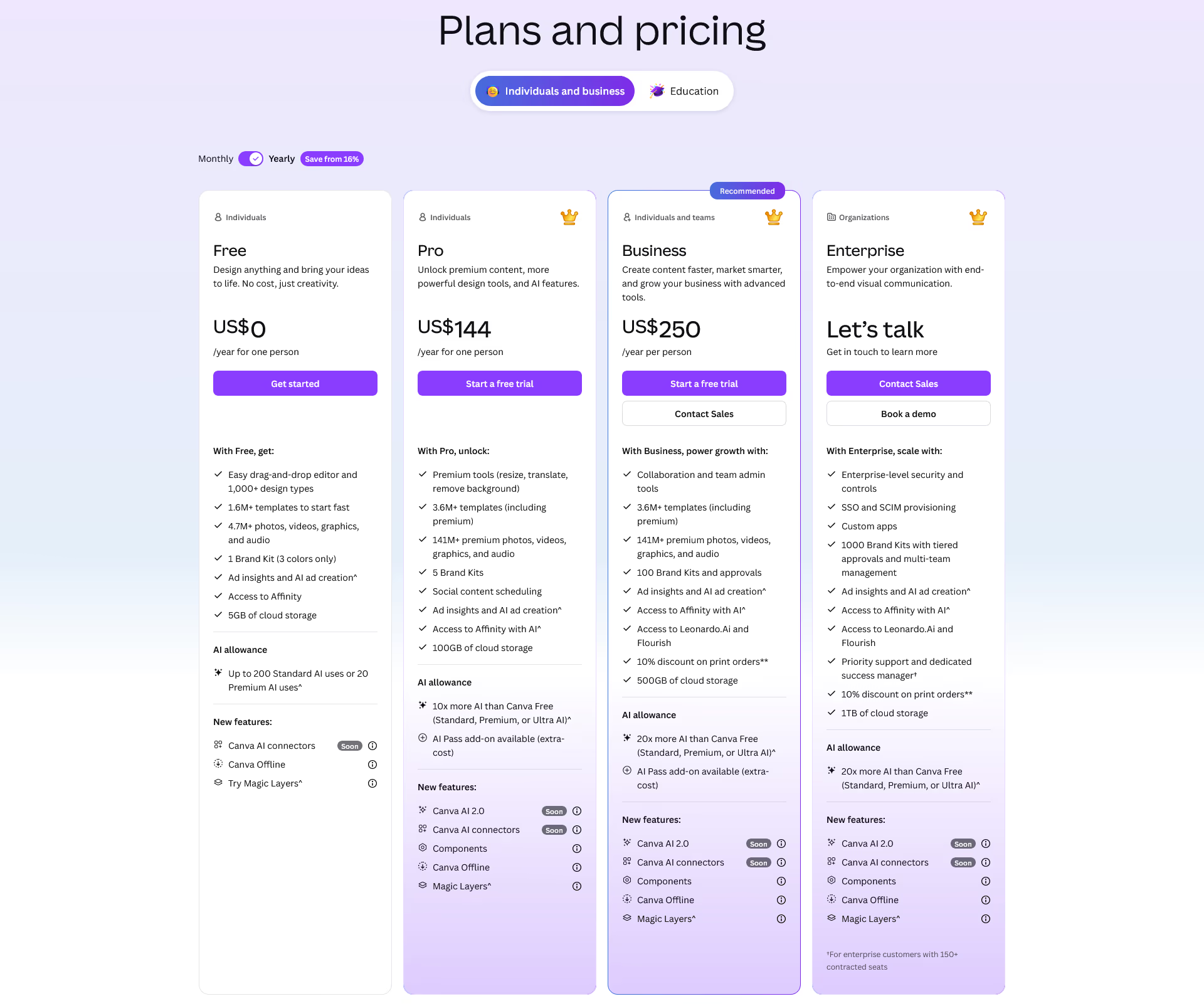
Canva usually offers several plans, including Free, Pro, Business, and Enterprise options.
The Free plan is good for basic design work and testing Canva AI features. It is useful for casual users, students, and people who only create a few designs per month.
Canva Pro is better for creators, freelancers, and small business owners who need more templates, premium assets, AI tools, and editing features.
Canva Business is designed for teams. It is better for users who need shared brand kits, team workflows, stronger collaboration, and more control.
Enterprise is made for larger companies that need advanced admin, security, and support features.
The right plan depends on how often you create content.
If you post content every week, Canva Pro or Canva Business can be worth the price.
If you only need a few simple graphics, the Free plan may be enough.
Our advice is simple: start with the free version, test the AI tools, and upgrade only if Canva becomes part of your regular workflow.
Before buying, always check the latest Canva AI pricing page because features, limits, and plan names can change.
Canva AI vs Adobe Firefly
A fair Canva AI vs Adobe Firefly comparison depends on the user.
Canva AI is better for speed, templates, social content, and simple workflows.
Adobe Firefly is better for users who already work with Adobe tools and want more professional creative control.
Canva is easier for beginners. It is a better fit for small businesses, creators, coaches, and social media teams.
Adobe Firefly may be better for designers, photographers, and video professionals who already use Photoshop, Illustrator, Premiere Pro, or Adobe Express.
Canva feels more like an all-in-one content studio.
Adobe Firefly feels more like a professional creative engine.
So which one should you choose?
Choose Canva AI if you want fast, simple, branded content.
Choose Adobe Firefly if you need deeper editing power and already use Adobe products.
For most non-designers, Canva AI will feel easier.
For advanced creatives, Adobe Firefly may offer more control.
Pros and Cons
Pros | Cons |
|---|---|
|
|
Real Use Cases for Canva AI
Canva AI works best when you use it for repeat content.
A social media manager can create weekly posts, story graphics, ad designs, and short video clips.
A small business owner can design menus, flyers, sale posters, product posts, and email banners.
A YouTuber can make thumbnails, channel art, shorts graphics, and promotional visuals.
A blogger can create featured images, Pinterest pins, quote graphics, and simple infographics.
A teacher can create worksheets, slides, classroom posters, and learning materials.
A marketing team can create campaign mockups, branded presentations, and multi-platform content.
These examples show why Canva AI is more than just a design toy.
It is a practical tool for daily content production.
You may not use every feature, but the full package is strong.
Is Canva AI Good for SEO Content Creators?
Yes, Canva AI can help SEO content creators, but not as a complete SEO tool.
It will not replace keyword research, content planning, or technical SEO.
But it can help you create visual assets that make your content more engaging.
For example, after writing a blog post, you can use Canva AI to create:
A featured image
A Pinterest graphic
A LinkedIn post
A short video teaser
A simple infographic
A downloadable checklist
A YouTube thumbnail
These assets can help your content get more attention.
For review websites, Canva AI is also useful. You can create comparison graphics, software review images, pros and cons visuals, and social media posts for each article.
This makes your content look more professional and more shareable.
So while Canva AI is not an SEO platform, it supports SEO by improving the media around your content.
Is Canva AI Worth It?
Yes, Canva AI is worth it for many creators, marketers, and small teams.
It is especially useful if you create content regularly and want to save time.
The main reason to use Canva AI is not that every output is perfect. The real benefit is that it helps you work faster.
You can create first drafts, design ideas, branded visuals, and short videos in less time.
You can also keep everything in one place.
This is why our Canva AI review is positive overall. Canva AI does not win every category, but it offers a strong mix of ease, speed, features, and value.
If you need advanced AI video, you may want a more specialized tool.
If you need deep photo editing, Adobe may be better.
But if you want one simple platform for everyday media production, Canva AI is one of the best choices.
Our rating: 4.5 out of 5
Final Verdict
Canva AI is one of the most useful AI media production tools for everyday creators.
It is simple, fast, and flexible. It helps users create designs, videos, presentations, ads, and branded content without advanced skills.
In this Canva AI review, we found that the biggest strength is the full workflow. Canva does not only generate images. It helps with design, writing, editing, resizing, branding, collaboration, and quick publishing.
That makes it very practical.
There are still some downsides. Some designs can feel generic. The AI video features are not the best for advanced projects. Magic Write needs editing. And the best results still require human creativity.
But Canva AI gets the most important thing right: it helps people create more content with less effort.
For creators, small businesses, bloggers, and marketing teams, it is a strong tool to try in 2026.
If we had to say it in one line, it would be this:
Canva AI is not the most advanced tool in every area, but it may be the easiest all-in-one creative platform for fast media production.
For simple design, quick videos, social media content, and everyday marketing work, Canva AI is absolutely worth using.
Explore Canva